GeezerVisonThe World Wide Web, restored to 800 pixels of glory. |
| Home|About|Gaming cabinet|Archives|How it works|Starter sites |
GeezerVison is showing www.tutorialspoint.com — Python - Sending Email 
Selected Reading
Python - Sending EmailSending Email in PythonYou can send email in Python by using several libraries, but the most common ones are smtplib and email. The "smtplib" module in Python defines an SMTP client session object that can be used to send mail to any Internet machine with an SMTP or ESMTP listener daemon. The email "package" is a library for managing email messages, including MIME and other RFC 2822-based message documents. An application that handles and delivers e-mail over the Internet is called a "mail server". Simple Mail Transfer Protocol (SMTP) is a protocol, which handles sending an e-mail and routing e-mail between mail servers. It is an Internet standard for email transmission. Python smptlib.SMTP() FunctionThe Python smtplib.SMTP() function is used to create an SMTP client session object, which establishes a connection to an SMTP server. This connection allows you to send emails through the server. Setting Up an SMTP ServerBefore sending an email, you need to set up an SMTP server. Common SMTP servers include those provided by Gmail, Yahoo, or other mail service providers. Creating an SMTP ObjectTo send an email, you need to obtain the object of SMTP class with the following function − import smtplib smtpObj = smtplib.SMTP( [host [, port [, local_hostname]]] ) Here is the detail of the parameters −
Example The following script connects to the SMTP server at "smtp.example.com" on port 25, optionally identifies and secures the connection, logs in (if required), sends an email, and then quits the session − import smtplib
# Create an SMTP object and establish a connection to the SMTP server
smtpObj = smtplib.SMTP('smtp.example.com', 25)
# Identify yourself to an ESMTP server using EHLO
smtpObj.ehlo()
# Secure the SMTP connection
smtpObj.starttls()
# Login to the server (if required)
smtpObj.login('username', 'password')
# Send an email
from_address = '[email protected]'
to_address = '[email protected]'
message = """\
Subject: Test Email
This is a test email message.
"""
smtpObj.sendmail(from_address, to_address, message)
# Quit the SMTP session
smtpObj.quit()
The Python smtpd ModuleThe Python smtpd module is used to create and manage a simple Mail Transfer Protocol (SMTP) server. This module allows you to set up an SMTP server that can receive and process incoming email messages, making it valuable for testing and debugging email functionalities within applications. Setting Up an SMTP Debugging ServerThe smtpd module comes pre-installed with Python and includes a local SMTP debugging server. This server is useful for testing email functionality without actually sending emails to specified addresses; instead, it prints the email content to the console. Running this local server eliminates the need to handle message encryption or use credentials to log in to an email server. Starting the SMTP Debugging ServerYou can start the local SMTP debugging server using the following command in Command Prompt or terminal − python -m smtpd -c DebuggingServer -n localhost:1025 Example The following example demonstrates how to send a dummy email using the smtplib functionality along with the local SMTP debugging server − import smtplib
def prompt(prompt):
return input(prompt).strip()
fromaddr = prompt("From: ")
toaddrs = prompt("To: ").split()
print("Enter message, end with ^D (Unix) or ^Z (Windows):")
# Add the From: and To: headers at the start!
msg = ("From: %s\r\nTo: %s\r\n\r\n"
% (fromaddr, ", ".join(toaddrs)))
while True:
try:
line = input()
except EOFError:
break
if not line:
break
msg = msg + line
print("Message length is", len(msg))
server = smtplib.SMTP('localhost', 1025)
server.set_debuglevel(1)
server.sendmail(fromaddr, toaddrs, msg)
server.quit()
In this example −
The sendmail() method of "smtplib" sends the email using the specified sender, recipient(s), and message content to the local SMTP debugging server running on "localhost" at port "1025". Output When you run the program, the console outputs the communication between the program and the SMTP server. Meanwhile, the terminal running the SMTPD server displays the incoming message content, helping you debug and verify the email sending process. python example.py From: [email protected] To: [email protected] Enter message, end with ^D (Unix) or ^Z (Windows): Hello World ^Z The console reflects the following log − From: [email protected] reply: retcode (250); Msg: b'OK' send: 'rcpt TO:<[email protected]>\r\n' reply: b'250 OK\r\n' reply: retcode (250); Msg: b'OK' send: 'data\r\n' reply: b'354 End data with <CR><LF>.<CR><LF>\r\n' reply: retcode (354); Msg: b'End data with <CR><LF>.<CR><LF>' data: (354, b'End data with <CR><LF>.<CR><LF>') send: b'From: [email protected]\r\nTo: [email protected]\r\n\r\nHello World\r\n.\r\n' reply: b'250 OK\r\n' reply: retcode (250); Msg: b'OK' data: (250, b'OK') send: 'quit\r\n' reply: b'221 Bye\r\n' reply: retcode (221); Msg: b'Bye' The terminal in which the SMTPD server is running shows this output − ---------- MESSAGE FOLLOWS ---------- b'From: [email protected]' b'To: [email protected]' b'X-Peer: ::1' b'' b'Hello World' ------------ END MESSAGE ------------ Sending an HTML e-mail using PythonTo send an HTML email using Python, you can use the smtplib library to connect to an SMTP server and the email.mime modules to construct and format your email content appropriately. Constructing the HTML Email MessageWhen sending an HTML email, you need to specify certain headers and structure the message content accordingly to ensure it is recognized and rendered as HTML by the recipient's email client. Example Following is the example to send HTML content as an e-mail in Python − import smtplib from email.mime.multipart import MIMEMultipart from email.mime.text import MIMEText # Email content sender = '[email protected]' receivers = ['[email protected]'] # Create message container - the correct MIME type is multipart/alternative. msg = MIMEMultipart('alternative') msg['From'] = 'From Person <[email protected]>' msg['To'] = 'To Person <[email protected]>' msg['Subject'] = 'SMTP HTML e-mail test' # HTML message content html = """\ <html> <head></head> <body> <p>This is an e-mail message to be sent in <b>HTML format</b></p> <p><b>This is HTML message.</b></p> <h1>This is headline.</h1> </body> </html> """ # Attach HTML content to the email part2 = MIMEText(html, 'html') msg.attach(part2) # Connect to SMTP server and send email try: smtpObj = smtplib.SMTP('localhost') smtpObj.sendmail(sender, receivers, msg.as_string()) print("Successfully sent email") except smtplib.SMTPException as e: print(f"Error: unable to send email. Error message: {str(e)}") Sending Attachments as an E-mailTo send email attachments in Python, you can use the smtplib library to connect to an SMTP server and the email.mime modules to construct and format your email content, including attachments. Constructing an Email with AttachmentsWhen sending an email with attachments, you need to format the email correctly using MIME (Multipurpose Internet Mail Extensions). This involves setting the Content-Type header to multipart/mixed to denote that the email contains both text and attachments. Each part of the email (text and attachments) is separated by boundaries. Example Following is the example, which sends an email with a file /tmp/test.txt as an attachment − import smtplib import base64 filename = "/tmp/test.txt" # Read a file and encode it into base64 format fo = open(filename, "rb") filecontent = fo.read() encodedcontent = base64.b64encode(filecontent) # base64 sender = '[email protected]' reciever = '[email protected]' marker = "AUNIQUEMARKER" body =""" This is a test email to send an attachment. """ # Define the main headers. part1 = """From: From Person <[email protected]> To: To Person <[email protected]> Subject: Sending Attachment MIME-Version: 1.0 Content-Type: multipart/mixed; boundary=%s --%s """ % (marker, marker) # Define the message action part2 = """Content-Type: text/plain Content-Transfer-Encoding:8bit %s --%s """ % (body,marker) # Define the attachment section part3 = """Content-Type: multipart/mixed; name=\"%s\" Content-Transfer-Encoding:base64 Content-Disposition: attachment; filename=%s %s --%s-- """ %(filename, filename, encodedcontent, marker) message = part1 + part2 + part3 try: smtpObj = smtplib.SMTP('localhost') smtpObj.sendmail(sender, reciever, message) print "Successfully sent email" except Exception: print "Error: unable to send email" Sending Email Using Gmail's SMTP ServerTo send an email using Gmail's SMTP server in Python, you need to set up a connection to smtp.gmail.com on port "587" with "TLS" encryption, authenticate using your Gmail credentials, construct the email message using Python's smtplib and email.mime libraries, and send it using the sendmail() method. Finally, close the SMTP connection with quit(). ExampleFollowing is an example script that demonstrates how to send an email using Gmail's SMTP server − import smtplib
# Email content
content = "Hello World"
# Set up SMTP connection to Gmail's SMTP server
mail = smtplib.SMTP('smtp.gmail.com', 587)
# Identify yourself to the SMTP server
mail.ehlo()
# Start TLS encryption for the connection
mail.starttls()
# Gmail account credentials
sender = '[email protected]'
password = 'your_password'
# Login to Gmail's SMTP server
mail.login(sender, password)
# Email details
recipient = '[email protected]'
subject = 'Test Email'
# Construct email message with headers
header = f'To: {recipient}\nFrom: {sender}\nSubject: {subject}\n'
content = header + content
# Send email
mail.sendmail(sender, recipient, content)
# Close SMTP connection
mail.quit()
Before running above script, sender's gmail account must be configured to allow access for 'less secure apps'. Visit following link. https://myaccount.google.com/lesssecureapps Set the shown toggle button to ON. 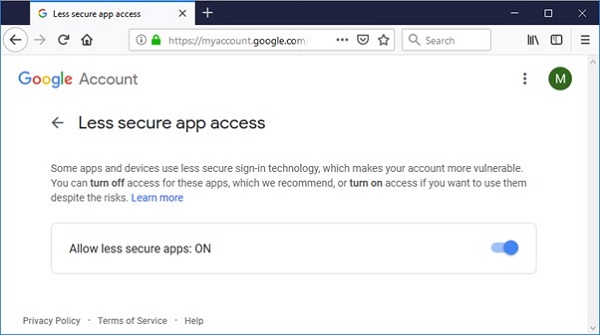
If everything goes well, execute the above script. The message should be delivered to the recipient's inbox. 
Advertisements
|
| You are visitor 01402503 — GeezerVison does not store the pages you look up. Best viewed with Netscape Navigator 4.7 or Internet Explorer 6 at 800×600. No cookies required. |