GeezerVisonThe World Wide Web, restored to 800 pixels of glory. | ||||||||||||||||||||
| Home|About|Gaming cabinet|Archives|How it works|Starter sites | ||||||||||||||||||||
GeezerVison is showing www.tutorialspoint.com — Python - Private Variables 
Selected Reading
Python - Private VariablesPython is an object-oriented programming language that allows you to create classes and objects. Encapsulation is one of the core principles of OPPs. To achieve encapsulation, we use private variables and methods. In this chapter, we will discuss private variables in Python and how to use them. Following topics will be covered in this chapter −
What are Private Variables?Private variables are a special type of variable that is only accessible within the class they are defined in. Means, they are not directly accessible from outside the class or from any subclass. This is done to protect the data and ensure that it is not modified or accessed by unauthorized code snippets. Only direct access is restricted. We can define a public method to access the private variable from outside the class, it is called a getter method. Similarly, we can use a setter method to modify the value of a private variable from outside the class. The image shows how Private variables are different from Public and Protected variables. 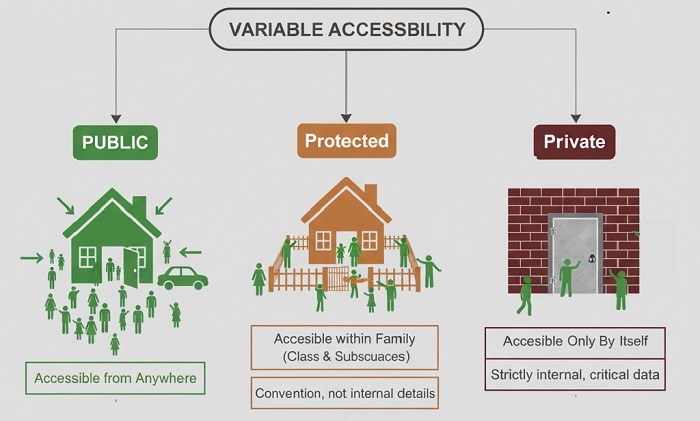
Defining Private Variables in PythonIn Python, private variables are defined by adding a double underscore (__) before the variable name. Unlike other programming languages like Java or C++, Python does not have strict access modifiers like public, private, or protected. So, the double underscore is a convention used to indicate that a variable is private. Similarly, a single underscore (_) is used to indicate that a variable is protected. ExampleThe code below shows how to define a private variable and access it using a public method. class MyClass:
def __init__(self):
self.__private_var = "I am Private"
def show_private(self):
return self.__private_var
obj = MyClass()
# print(obj.__private_var) # ✗ AttributeError
print(obj.show_private()) # ✓ Access through method
We have commented out the direct access to the private variable (Uncommenting it will raise an AttributeError). So, the output of the above code will be − I am Private Name Mangling for Private VariablesIn Python, private variables are not truly private. They can still be accessed from outside the class using a technique called name mangling. That is, when you create a private variable using a double underscore (__var), Python internally changes its name to _ClassName__var. Now, you can access the private variable using this mangled name. Let's see an example to understand this better. class MyClass:
def __init__(self):
self.__private_var = "I am Private"
def show_private(self):
return self.__private_var
obj = MyClass()
# Accessing private variable using name mangling
print(obj._MyClass__private_var) # ✓ Access using name mangling
The output of the above code will be − I am Private Private Methods in PythonSimilar to private variables, we can also define private methods in Python. Private methods are methods that are only accessible within the class they are defined in. They are not accessible from outside the class or from any subclass. To define a private method, we use a double underscore (__) before the method name. class MyClass:
def __init__(self):
self.__private_var = "I am Private"
def __private_method(self):
return "This is a private method"
def show_private(self):
return self.__private_var + " and " + self.__private_method()
obj = MyClass()
print(obj.show_private()) # ✓ Access through method
# print(obj.__private_method()) # ✗ AttributeError
print(obj._MyClass__private_method()) # ✓ Access using name mangling
The output of the above code will be − I am Private and This is a private method This is a private method Real World Example of Private VariablesConsider a banking application where we have a class called BankAccount. This class has private variables for the account number and balance. We will define public methods to deposit, withdraw, and check the balance. We need to ensure that balance cannot be directly modified outside the class, but can only be changed through deposit and withdraw methods. The code below demonstrates this concept. class BankAccount:
def __init__(self, account_number, balance):
self.__account_number = account_number # Private
self.__balance = balance # Private
def deposit(self, amount):
if amount > 0:
self.__balance += amount
return self.__balance
def withdraw(self, amount):
if 0 < amount <= self.__balance:
self.__balance -= amount
return self.__balance
def get_balance(self):
return self.__balance
account = BankAccount("12345", 1000)
# Direct access will fail
try:
account.__balance += 500 # ✗ AttributeError
except AttributeError:
print("Direct access to private variable failed!!!")
# Access using methods
print("Your account balance is: ", account.get_balance()) # ✓ 1000
account.deposit(500)
print("Your account balance after deposit is: ", account.get_balance()) # ✓ 1500
The output of the above code will be − Direct access to private variable failed!!! Your account balance is: 1000 Your account balance after deposit is: 1500 Public vs Protected vs Private VariablesHere is a tabular comparison of Public, Protected, and Private variables in Python −
ConclusionIn this chapter, we learned about private variables in Python and how to use them to achieve encapsulation. We also discussed name mangling, how private methods work, getters and setters. The name mangling technique allows us to access private variables and methods from outside the class, but it is not recommended to use it as it breaks the encapsulation principle. 
Advertisements
| ||||||||||||||||||||
| You are visitor 01402503 — GeezerVison does not store the pages you look up. Best viewed with Netscape Navigator 4.7 or Internet Explorer 6 at 800×600. No cookies required. |