GeezerVisonThe World Wide Web, restored to 800 pixels of glory. |
| Home|About|Gaming cabinet|Archives|How it works|Starter sites |
GeezerVison is showing www.tutorialspoint.com — Random Walk Implementation in Python 
Selected Reading
Random Walk Implementation in PythonA random walk is a process where each step you take is determined randomly, often used to model unpredictable movement. which is used to characterize a path that consists of a sequence of random moves. A simple random walk can be one-dimensional where a particle has to move either towards left or the right without any bias. With regards to the concept of random walk applied in higher dimensions like 2D, 3D and 4D, movement is made in random directions in the particular dimensions. Each of the additional dimensions leads to additional difficulty of the walk and offers more information on random processes and space searching. These are theories with Python code for Random Walk in 1D, 2D, 3D, & 4D to explain how they can be simulated computer graphics. Installation of Required Libraries1. NumPyThe NumPy library for numerical computations in Python, useful for handling arrays and performing mathematical operations. Syntaxpip install numpy 2. MatplotlibThe Matplotlib is a plotting library for creating static, animated, and interactive visualizations in Python. Syntaxpip install matplotlib Implementation of 1D Random WalkThe following code is for 1D random walk implementation in Python − import numpy as np
import matplotlib.pyplot as plt
def random_walk_1d(steps):
"""Generate a 1D random walk."""
walk = np.zeros(steps)
for i in range(1, steps):
step = np.random.choice([-1, 1])
walk[i] = walk[i - 1] + step
return walk
# Number of steps
steps = 1000
walk = random_walk_1d(steps)
# Plot the random walk
plt.figure(figsize=(10, 6))
plt.plot(walk, label='1D Random Walk')
plt.xlabel('Steps')
plt.ylabel('Position')
plt.title('1D Random Walk')
plt.legend()
plt.show()
Output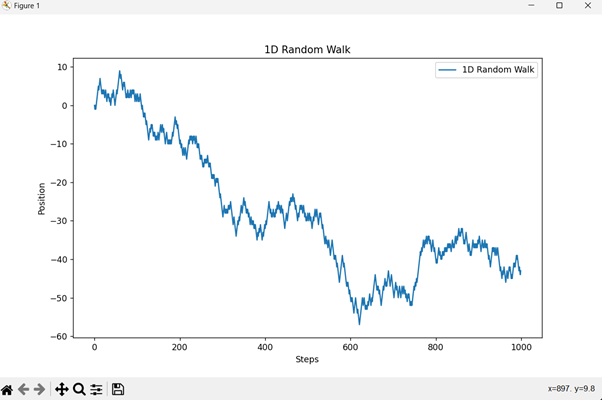
Code Explanation
Implementation of 2D Random WalkThe following code is for 2D random walk implementation in Python − import numpy as np
import matplotlib.pyplot as plt
def random_walk_2d(steps):
"""Generate a 2D random walk."""
positions = np.zeros((steps, 2))
for i in range(1, steps):
step = np.random.choice(['up', 'down', 'left', 'right'])
if step == 'up':
positions[i] = positions[i - 1] + [0, 1]
elif step == 'down':
positions[i] = positions[i - 1] + [0, -1]
elif step == 'left':
positions[i] = positions[i - 1] + [-1, 0]
elif step == 'right':
positions[i] = positions[i - 1] + [1, 0]
return positions
# Number of steps
steps = 1000
positions = random_walk_2d(steps)
# Plot the random walk
plt.figure(figsize=(10, 10))
plt.plot(positions[:, 0], positions[:, 1], label='2D Random Walk')
plt.xlabel('X Position')
plt.ylabel('Y Position')
plt.title('2D Random Walk')
plt.legend()
plt.grid(True)
plt.show()
Output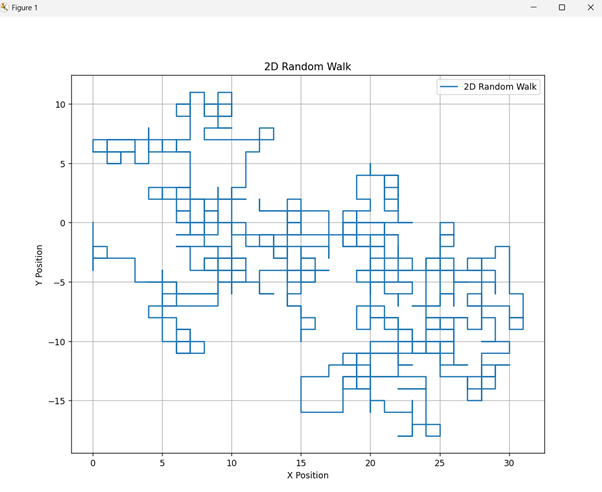
Code ExplanationMoves in one of the four ways − upwards, downwards, leftwards or rightwards. Updates the position accordingly and records each step. Implementation of 3D Random WalkThe following code is for 3D random walk implementation in Python − import numpy as np
import matplotlib.pyplot as plt
from mpl_toolkits.mplot3d import Axes3D
def random_walk_3d(steps):
"""Generate a 3D random walk."""
positions = np.zeros((steps, 3))
for i in range(1, steps):
step = np.random.choice(['x+', 'x-', 'y+', 'y-', 'z+', 'z-'])
if step == 'x+':
positions[i] = positions[i - 1] + [1, 0, 0]
elif step == 'x-':
positions[i] = positions[i - 1] + [-1, 0, 0]
elif step == 'y+':
positions[i] = positions[i - 1] + [0, 1, 0]
elif step == 'y-':
positions[i] = positions[i - 1] + [0, -1, 0]
elif step == 'z+':
positions[i] = positions[i - 1] + [0, 0, 1]
elif step == 'z-':
positions[i] = positions[i - 1] + [0, 0, -1]
return positions
# Number of steps
steps = 1000
positions = random_walk_3d(steps)
# Plot the random walk
fig = plt.figure(figsize=(10, 10))
ax = fig.add_subplot(111, projection='3d')
ax.plot(positions[:, 0], positions[:, 1], positions[:, 2], label='3D Random Walk')
ax.set_xlabel('X Position')
ax.set_ylabel('Y Position')
ax.set_zlabel('Z Position')
ax.set_title('3D Random Walk')
ax.legend()
plt.show()
Output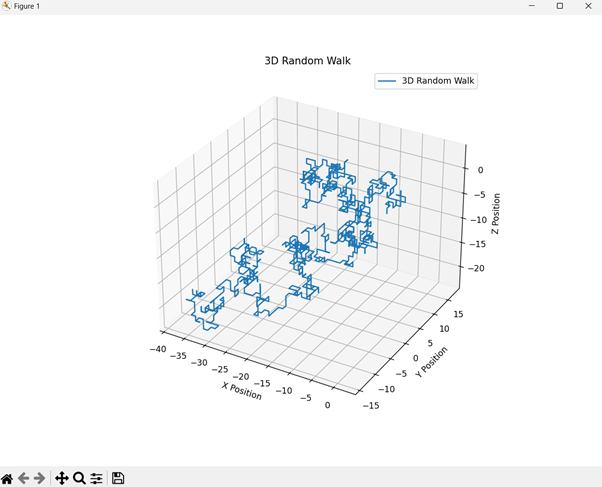
Code Explanation
Implementation of 4D Random WalkThe following code is for 4D random walk implementation in Python − import numpy as np
import matplotlib.pyplot as plt
from mpl_toolkits.mplot3d import Axes3D
def random_walk_4d(steps):
"""Generate a 4D random walk."""
positions = np.zeros((steps, 4))
for i in range(1, steps):
direction = np.random.choice(['x+', 'x-', 'y+', 'y-', 'z+', 'z-', 'w+', 'w-'])
if direction == 'x+':
positions[i] = positions[i - 1] + [1, 0, 0, 0]
elif direction == 'x-':
positions[i] = positions[i - 1] + [-1, 0, 0, 0]
elif direction == 'y+':
positions[i] = positions[i - 1] + [0, 1, 0, 0]
elif direction == 'y-':
positions[i] = positions[i - 1] + [0, -1, 0, 0]
elif direction == 'z+':
positions[i] = positions[i - 1] + [0, 0, 1, 0]
elif direction == 'z-':
positions[i] = positions[i - 1] + [0, 0, -1, 0]
elif direction == 'w+':
positions[i] = positions[i - 1] + [0, 0, 0, 1]
elif direction == 'w-':
positions[i] = positions[i - 1] + [0, 0, 0, -1]
return positions
# Number of steps
steps = 1000
positions = random_walk_4d(steps)
# Plot a 4D random walk by projecting onto 3D
fig = plt.figure(figsize=(10, 10))
# 3D projection using first three dimensions
ax1 = fig.add_subplot(121, projection='3d')
ax1.plot(positions[:, 0], positions[:, 1], positions[:, 2], label='Projection: X-Y-Z')
ax1.set_xlabel('X Position')
ax1.set_ylabel('Y Position')
ax1.set_zlabel('Z Position')
ax1.set_title('4D Random Walk (Projection)')
ax1.legend()
# Another 3D projection using last three dimensions
ax2 = fig.add_subplot(122, projection='3d')
ax2.plot(positions[:, 1], positions[:, 2], positions[:, 3], label='Projection: Y-Z-W')
ax2.set_xlabel('Y Position')
ax2.set_ylabel('Z Position')
ax2.set_zlabel('W Position')
ax2.set_title('4D Random Walk (Projection)')
ax2.legend()
plt.show()
Ouptut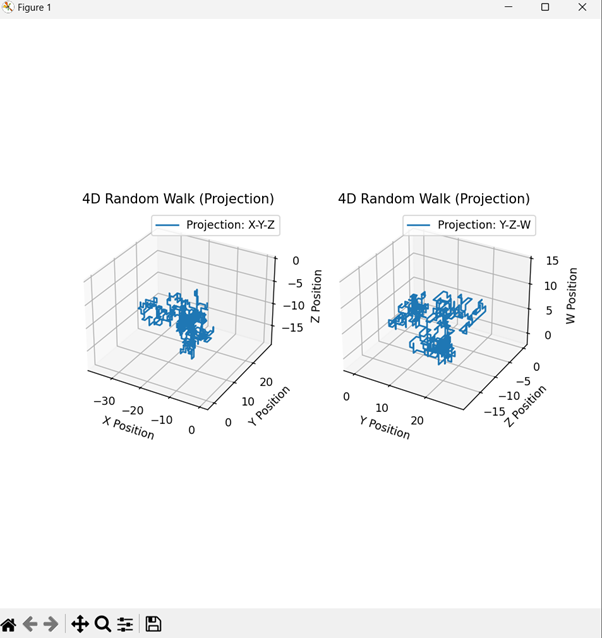
Code Explanation
python_projects_from_basic_to_advanced.htm

Advertisements
|
| You are visitor 01402503 — GeezerVison does not store the pages you look up. Best viewed with Netscape Navigator 4.7 or Internet Explorer 6 at 800×600. No cookies required. |