Tkinter Bitmaps
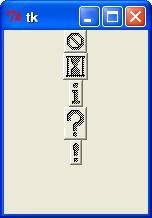
This attribute to displays a bitmap. There are following type of bitmaps available −
- "error"
- "gray75"
- "gray50"
- "gray25"
- "gray12"
- "hourglass"
- "info"
- "questhead"
- "question"
- "warning"
Example
from tkinter import *
import tkinter

top = Tk()

B1 = Button(top, text ="error", relief=RAISED,\ bitmap="error")
B2 = Button(top, text ="hourglass", relief=RAISED,\ bitmap="hourglass")
B3 = Button(top, text ="info", relief=RAISED,\ bitmap="info")
B4 = Button(top, text ="question", relief=RAISED,\ bitmap="question")
B5 = Button(top, text ="warning", relief=RAISED,\ bitmap="warning")

B1.pack()
B2.pack()
B3.pack()
B4.pack()
B5.pack()
top.mainloop()
When the above code is executed, it produces the following result −
python_gui_programming.htm

