Tkinter Canvas
The Canvas is a rectangular area intended for drawing pictures or other complex layouts. You can place graphics, text, widgets or frames on a Canvas.
Syntax
Here is the simple syntax to create this widget −
w = Canvas ( master, option=value, ... )
Parameters
| Sr.No. |
Option & Description |
| 1 |
Bd Border width in pixels. Default is 2. |
| 2 |
Bg Normal background color. |
| 3 |
Confine If true (the default), the canvas cannot be scrolled outside of the scrollregion. |
| 4 |
Cursor Cursor used in the canvas like arrow, circle, dot etc. |
| 5 |
Height Color shown in the focus highlight. |
| 6 |
Relief Relief specifies the type of the border. Some of the values are SUNKEN, RAISED, GROOVE, and RIDGE. |
| 7 |
Scrollregion A tuple (w, n, e, s) that defines over how large an area the canvas can be scrolled, where w is the left side, n the top, e the right side, and s the bottom. |
| 8 |
Width Size of the canvas in the X dimension. |
| 9 |
Xscrollincrement If you set this option to some positive dimension, the canvas can be positioned only on multiples of that distance, and the value will be used for scrolling by scrolling units, such as when the user clicks on the arrows at the ends of a scrollbar. |
| 10 |
Xscrollcommand If the canvas is scrollable, this attribute should be the .set() method of the horizontal scrollbar. |
| 11 |
Yscrollincrement Works like xscrollincrement, but governs vertical movement. |
| 12 |
Yscrollcommand If the canvas is scrollable, this attribute should be the .set() method of the vertical scrollbar. |
The Canvas widget can support the following standard items −
coord = 10, 50, 240, 210

arc = canvas.create_arc(coord, start=0, extent=150, fill="blue")
filename = PhotoImage(file = "sunshine.gif")

image = canvas.create_image(50, 50, anchor=NE, image=filename)
line = canvas.create_line(x0, y0, x1, y1, ..., xn, yn, options)
oval = canvas.create_oval(x0, y0, x1, y1, options)
oval = canvas.create_polygon(x0, y0, x1, y1,...xn, yn, options)
Example
Try the following example yourself −
from tkinter import *
from tkinter import messagebox
top = Tk()
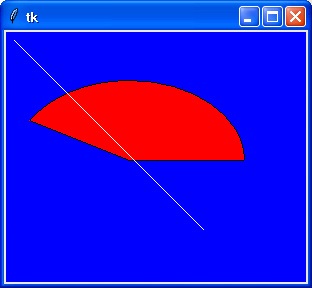
C = Canvas(top, bg="blue", height=250, width=300)
coord = 10, 50, 240, 210
arc = C.create_arc(coord, start=0, extent=150, fill="red")
line = C.create_line(10,10,200,200,fill='white')
C.pack()
top.mainloop()
When the above code is executed, it produces the following result −
python_gui_programming.htm

