Tkinter pack() Method
This geometry manager organizes widgets in blocks before placing them in the parent widget.
Syntax
widget.pack( pack_options )
Here is the list of possible options −
expand − When set to true, widget expands to fill any space not otherwise used in widget's parent.
fill − Determines whether widget fills any extra space allocated to it by the packer, or keeps its own minimal dimensions: NONE (default), X (fill only horizontally), Y
(fill only vertically), or BOTH (fill both horizontally and vertically).
side − Determines which side of the parent widget packs against: TOP (default), BOTTOM, LEFT, or RIGHT.
Example
Try the following example by moving cursor on different buttons −
from tkinter import *

root = Tk()
frame = Frame(root)
frame.pack()

bottomframe = Frame(root)
bottomframe.pack( side = BOTTOM )

redbutton = Button(frame, text="Red", fg="red")
redbutton.pack( side = LEFT)

greenbutton = Button(frame, text="Brown", fg="brown")
greenbutton.pack( side = LEFT )

bluebutton = Button(frame, text="Blue", fg="blue")
bluebutton.pack( side = LEFT )

blackbutton = Button(bottomframe, text="Black", fg="black")
blackbutton.pack( side = BOTTOM)

root.mainloop()
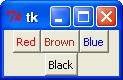
When the above code is executed, it produces the following result −
python_gui_programming.htm

