GeezerVisonThe World Wide Web, restored to 800 pixels of glory. |
| Home|About|Gaming cabinet|Archives|How it works|Starter sites |
GeezerVison is showing codescracker.com — Python program to find the sum of n numbers
Python program to find the sum of n numbersIn this article, you will learn and get code to find the sum of "n" numbers entered by the user using a Python program. Here is the list of programs:
For example, if the user enters the value of "n" as 3 and then three numbers as 1, 2, and 3, then the answer will be "1+2+3" or 6. Using a for loop, compute the sum of n numbersThis program finds the sum of "n" numbers using a "for loop." Here, the value of "n" and then "n" numbers must be entered by the user as shown in the program and its output given below: sum = 0 print("Enter the Value of n: ") n = int(input()) print("Enter " + str(n) + " Numbers: ") for i in range(n): num = int(input()) sum = sum+num print("Sum of " + str(n) + " Numbers = " + str(sum)) Here is its sample run: 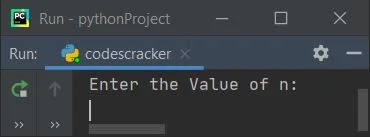
Now supply the input, say 6 as the value of n, and then enter 6 numbers, say 10, 20, 30, 40, 50, and 60. Here is the sample output with exactly these inputs: 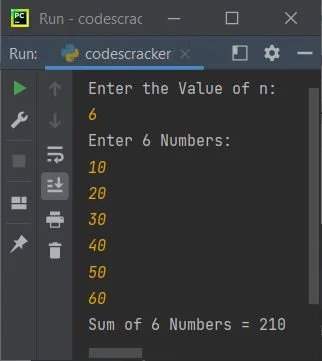
Note: "str()" is used to convert from integer to string. Because the "+" operator in Python is used to concatenate only values of the same type. The following code for i in range(n): is used to execute the following block of code: num = int(input()) sum = sum+num n number of times, starting with the value of i from 0 to n-1. For example, if the user enters the value of n as 10, then this block of code gets executed 10 times. Using this block, we've received 10 numbers, which add their values and are initialized to "sum," one by one. Using a while loop, compute the sum of n numbersThis program does the same job as the previous program, using "while" loop instead of "for": sum = 0 i=0 print(end="Enter the Value of n: ") n = int(input()) print(end="Enter " + str(n) + " Numbers: ") while i<n: num = int(input()) sum = sum+num i = i+1 print("\nSum of " + str(n) + " Numbers = " + str(sum)) Here is its sample run, with user input of 10 as the value of n and 1, 2, 3, 4, 5, 6, 7, 8, 9, and 10 as the 10 numbers: 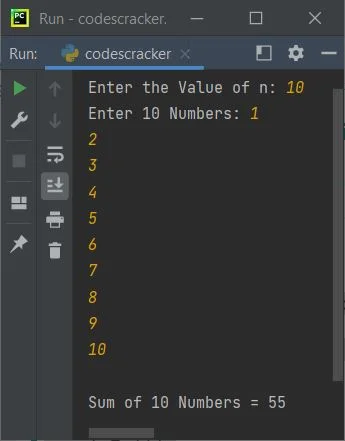
Sum of n numbers using a list (an array)This program finds and prints the addition result (or sum) of "n" numbers entered by the user at run-time using "list." A list is like an array: num = [] sum = 0 print(end="Enter the Value of n: ") n = int(input()) print(end="Enter " + str(n) + " Numbers: ") for i in range(n): num.insert(i, int(input())) for i in range(n): sum = sum+num[i] print("\nSum of " + str(n) + " Numbers = " + str(sum)) Here is its sample run with the user input, 5 as the value of n, and 5, 6, 7, 10, and 12 as five numbers: 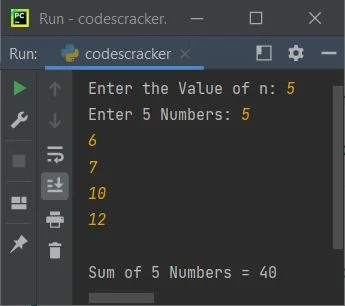
The following code for i in range(n): is used to execute the following statement: num.insert(i, int(input())) n times with i values ranging from 0 to n-1. Therefore, using "insert()," the value entered by the user gets inserted into the list num[] one by one in this way:
Find the sum of n numbers using a functionThis program is the last one in this article. This program also finds the sum of n numbers, as done in previous programs using different approaches. This program, like those, approaches the same task in a different way (a user-defined function): def SumOfNNums(arr, tot): s = 0 for i in range(tot): s = s+arr[i] return s num = [] print(end="Enter the Value of n: ") n = int(input()) print(end="Enter " + str(n) + " Numbers: ") for i in range(n): num.insert(i, int(input())) sum = SumOfNNums(num, n) print("\nSum of " + str(n) + " Numbers = " + str(sum)) Here is its sample run with user input, "3" as value of "n" and "20, 30, 10" as 3 numbers: 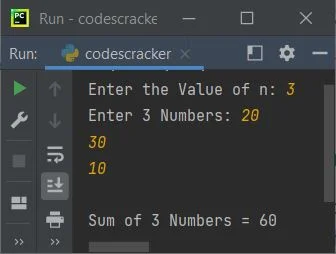
with the following statement: sum = SumOfNNums(num, n) We've called the function "SumOfNNums()." So after executing this statement, the function gets executed, and the value returned by the function is the result, which is the sum of "n" numbers entered by the user. So the return value gets initialized to "sum," and its value gets printed. « Previous Program Next Program » Practice Quizzes
Test your programming and computer science knowledge with interactive MCQs and topic-based quizzes. Popular Topics
Explore the most popular programming and computer science tutorials on CodesCracker. |
| You are visitor 01402503 — GeezerVison does not store the pages you look up. Best viewed with Netscape Navigator 4.7 or Internet Explorer 6 at 800×600. No cookies required. |