GeezerVisonThe World Wide Web, restored to 800 pixels of glory. |
| Home|About|Gaming cabinet|Archives|How it works|Starter sites |
GeezerVison is showing codescracker.com — Python Program to Add Two Binary Numbers
Python Program to Add Two Binary NumbersIn this article, you will learn and get code to add two binary numbers entered by the user using a Python program. Here is a list of programs for binary number addition:
How to Add Two Binary NumbersHere are the rules for binary number addition: 1 + 0 = 1 0 + 1 = 1 0 + 0 = 0 1 + 1 = 10 (0 and carry 1) 1 + 1 + 1 = 11 (1 and carry 1) For example 1 1 1 0 1 + 1 1 1 1 1 ----------- 1 1 1 1 0 0 Add two binary numbers directlyThis program finds and prints the sum of two given binary numbers in a direct way. Here, direct way means that this program is created using int() and bin(), pre-defined functions of Python. Let's have a look at the program. I'll explain it later on. print("Enter First Binary Number: ") nOne = int(input()) print("Enter Second Binary Number: ") nTwo = int(input()) nOne = str(nOne) nTwo = str(nTwo) iSum = int(nOne, 2) + int(nTwo, 2) bSum = bin(iSum) print("Result = " + bSum) Here is its sample run: 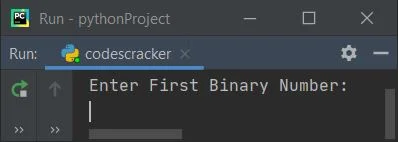
Now supply any two binary numbers, say 1110 as the first and 1111 as the second. Here is the sample run with exactly the same input: 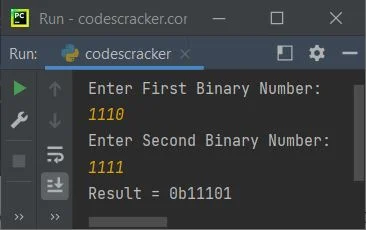
That is, 1110 + 1111 = 11101, or 0b1110 + 0b1111 = 0b11101. Note: The int(num, 2) returns a decimal integer equivalent of the binary number stored in num. Here, 2 is the base of the number stored in num. Therefore, the following statement: iSum = int(nOne, 2) + int(nTwo, 2) converts nOne and nTwo into their decimal integer equivalents and adds them. Its addition result gets initialized to the iSum variable. And using the bin() method, we've converted the decimal integer value into its equivalent binary number. Note: The bin() function returns the binary equivalent string of an integer passed as its argument. The dry run of the above program with user inputs 1110 and 1111 goes like this:
Modified version of the previous programThis program is a modified version of the previous program with some better-looking output: print(end="Enter First Binary Number: ") nOne = int(input()) print(end="Enter Second Binary Number: ") nTwo = int(input()) nOne = str(nOne) nTwo = str(nTwo) iSum = int(nOne, 2) + int(nTwo, 2) bSum = bin(iSum) print("\n" + nOne + " + " + nTwo + " = " + bSum[2:]) Here is its sample run with user input, with 111 as the first and 111 as the second binary numbers: 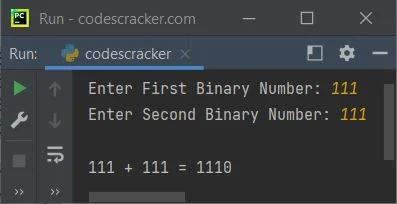
Note: The bSum[2:] is used to print from the 2nd index. It is used to skip 0b of bSum. That is, 0 is at the 0th index, and b is at the 1st index. Add two binary numbers using user-defined codeThis program is created with complete user-based code to add two binary numbers entered by the user. Because in this program, we've not used any type of pre-defined function: print(end="Enter First Binary Number: ") nOne = int(input()) print(end="Enter Second Binary Number: ") nTwo = int(input()) nOne = str(nOne) nTwo = str(nTwo) mLen = max(len(nOne), len(nTwo)) nOne = nOne.zfill(mLen) nTwo = nTwo.zfill(mLen) addRes = "" carry = 0 for i in range(mLen - 1, -1, -1): re = carry if nOne[i] == '1': re = re+1 else: re = re+0 if nTwo[i] == '1': re = re+1 else: re = re+0 if re%2==1: addRes = '1' + addRes else: addRes = '0' + addRes if re<2: carry = 0 else: carry = 1 if carry!=0: addRes = '1' + addRes print(addRes) Here is its sample run, with 11101 as the first binary number and 11111 as the second binary number: 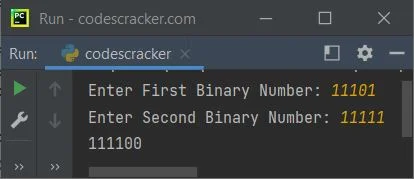
Note: The zfill() method is used to add zeros (0) at the beginning of the string. Its length is specified through its argument. Note: The max() returns the maximum number from the numbers provided as its argument. Modified version of the previous programThis program is again a modified version of the previous program. In this program, we've shortened the logical code to create a program that looks a little smaller than the previous one: print(end="Enter First Binary Number: ") nOne = int(input()) print(end="Enter Second Binary Number: ") nTwo = int(input()) nOne = str(nOne) nTwo = str(nTwo) mLen = max(len(nOne), len(nTwo)) nOne = nOne.zfill(mLen) nTwo = nTwo.zfill(mLen) addRes = "" carry = 0 for i in range(mLen - 1, -1, -1): re = carry re += 1 if nOne[i] == '1' else 0 re += 1 if nTwo[i] == '1' else 0 addRes = ('1' if re%2==1 else '0') + addRes carry = 0 if re<2 else 1 if carry!=0: addRes = '1' + addRes print("\n" + nOne + " + " + nTwo + " = " + addRes) Here is its sample run with user input 101 as the first binary number and 100 as the second binary number: 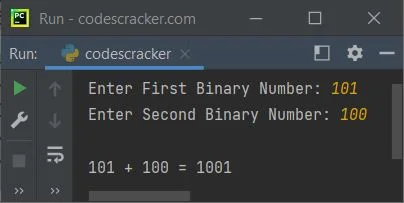
« Previous Program Next Program » Practice Quizzes
Test your programming and computer science knowledge with interactive MCQs and topic-based quizzes. Popular Topics
Explore the most popular programming and computer science tutorials on CodesCracker. |
| You are visitor 01402503 — GeezerVison does not store the pages you look up. Best viewed with Netscape Navigator 4.7 or Internet Explorer 6 at 800×600. No cookies required. |