GeezerVisonThe World Wide Web, restored to 800 pixels of glory. |
| Home|About|Gaming cabinet|Archives|How it works|Starter sites |
GeezerVison is showing codescracker.com — Python Program to Insert an Element in a List
Python Program to Insert an Element in a ListThis article is created to cover some programs in Python that insert an element (or more) in a list at the end or at any particular index (or position). Both elements and lists must be entered by the user at runtime. Here is a list of programs:
Insert an element at the end of a listThis program inserts an element entered by the user at the end of a list. The question is: write a Python program to insert an element in a list. Here is its answer: print("Enter 10 Elements of List: ") nums = [] for i in range(10): nums.insert(i, input()) print("Enter an Element to Insert at End: ") elem = input() nums.append(elem) print("\nThe New List is: ") print(nums) Here is its sample run: 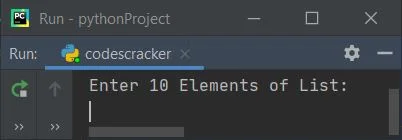
Now supply the input, say 1, 2, 3, 4, 5, 6, 7, 8, 9, 10 as ten numbers, then 11 as a number to insert in the list: 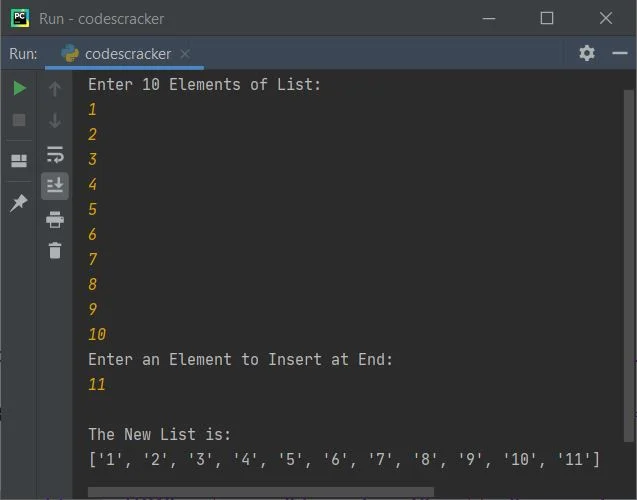
In the above program, the following statement: nums.insert(i, input()) states that the entered value gets initialized at ith index of nums. For example, if the user enters 10 and the current value of i is 2, then 10 gets initialized to nums[2]. Since initially the list nums is empty, you can also replace the above statement with statement given below: nums.append(input()) Note: The append() method appends an element (provided as its argument) at the end of a list. Note: An empty list can also be defined using nums = list(). Modified Version of the Previous ProgramThis program allows the user to define the size of the list. The end used in this program is to skip inserting an automatic newline. str() converts any type of value to a string. print("Enter the Size: ", end="") try: numsSize = int(input()) print("Enter " +str(numsSize)+ " Elements: ", end="") nums = [] for i in range(numsSize): nums.append(input()) print("\nEnter an Element to Insert at End: ") elem = input() nums.append(elem) numsSize = numsSize+1 print("\nThe New List is: ") for i in range(numsSize): print(end=nums[i] + " ") print() except ValueError: print("\nInvalid Input!") Here is its sample run with user input: 5 as size, 1, 2, 3, 4, 5 as five elements, and 2 as an element to insert at the end of the given list: 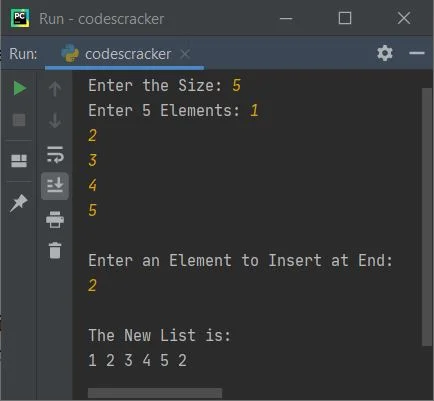
Here is another sample run with user input: 11 as size, c, o, d, e, s, c, r, a, c, k, e as eleven elements, and then r as an element to insert at the end of the list: 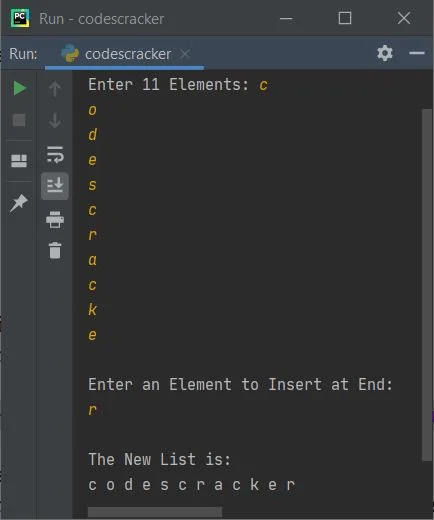
From the above program, the following statement: print(end=nums[i] + " ") can also be written as: print(nums[i], end=" ") Note: The try-except is used to handle invalid inputs. The first statement of try, numsSize = int(input()), gets executed because it wants to receive an integer input from the user. But if the user enters a non-integer value, then it raises a ValueError; therefore, program flow goes to except ValueError's body and prints a message, whatever the programmer specified. Insert Multiple Elements at the End of a ListThis program allows the user to insert multiple (more than one) elements at the end of a list during one execution of the program. Let's have a look at the program first: print("Enter Size: ", end="") try: tot = int(input()) print("Enter " +str(tot)+ " Elements: ", end="") arr = list() for i in range(tot): arr.append(input()) print("\nThe List is:") for i in range(len(arr)): print(arr[i], end=" ") print("\n\nHow many element to insert ? ", end="") try: toti = int(input()) print("Enter " +str(toti)+ " Elements: ", end="") for i in range(toti): arr.append(input()) print("\nThe New List is:") for i in range(len(arr)): print(arr[i], end=" ") print() except ValueError: print("\nInvalid Input!") except ValueError: print("\nInvalid Input!") Here is its sample run with user inputs: 3 as list size, 1, 2, and 3 as three elements, then 4 as the size of elements to insert, and then 5, 6, 7, and 8 as four elements to insert: 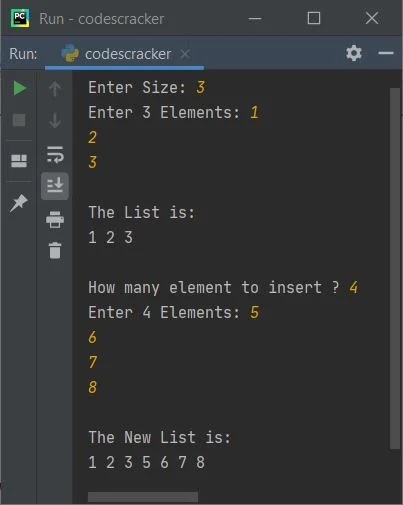
The dry run of the above program with the same user input as provided in the sample run given above goes like this:
Insert an element at a specific index (position)As you can see from the very first program of this article, the insert() method is used to insert an element at a particular index number specified as its first argument. Therefore, using the insert() method, this program inserts an element at a specified index by the user at run-time: nums = [] print(end="Enter the Size: ") numsSize = int(input()) print(end="Enter " +str(numsSize)+ " Elements: ") for i in range(numsSize): nums.append(input()) print("\nEnter an Element to Insert: ") elem = input() print(end="At what index ? ") pos = int(input()) nums.insert(pos, elem) numsSize = numsSize+1 print("\nThe New List is: ") for i in range(numsSize): print(end=nums[i] + " ") print() Here is its sample run with user input: 5 as the size of the list, 1, 3, 4, 5, 6 as the number of elements, 2 as the element to insert, and 1 as the index of the element to store in the list: 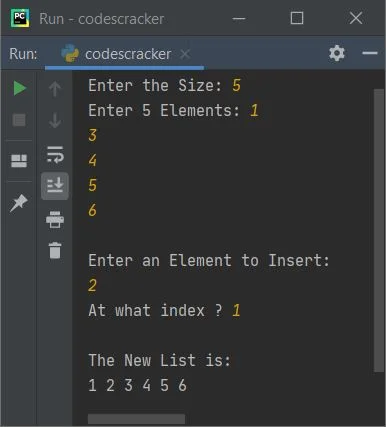
Note: To follow the position's value, use the nums.insert((pos+1), elem) statement to insert an element at the given position. Because indexing starts with 0, generally people refer to the 0th index element as the first position's element. Insert multiple elements at given indexes in the listThis is the last program in this article, which is a complete version of inserting multiple elements at given indexes in a list at one execution. This program also handles all types of invalid inputs using try-except: print("Enter Size: ", end="") try: tot = int(input()) print("Enter " +str(tot)+ " Elements: ", end="") arr = list() for i in range(tot): arr.append(input()) print("\nThe List is:") for i in range(len(arr)): print(arr[i], end=" ") print("\n\nHow many element to insert ? ", end="") try: toti = int(input()) arrdele = list() arrdeli = list() for i in range(toti): print("Enter Element and its Index Number: ", end="") arrdele.append(input()) try: k = int(input()) if k > (len(arr) + len(arrdele)): print("\nInvalid Input!") exit() arrdeli.append(k) except ValueError: print("\nInvalid Input!") exit() for i in range(toti): arr.insert(arrdeli[i], arrdele[i]) print("\nThe New List is:") for i in range(len(arr)): print(arr[i], end=" ") print() except ValueError: print("\nInvalid Input!") except ValueError: print("\nInvalid Input!") Here is its sample run with user inputs: 3 as size, 1, 2, 3 as its three elements, and 4 as the number of elements to insert in the entered list right now. Then 11 is the first element, and 0 is its index number. Again, 22 as the second element and 2 as its index number, then 33 as the third element and 4 as its index number, and finally 44 as the element and 6 as its index number: 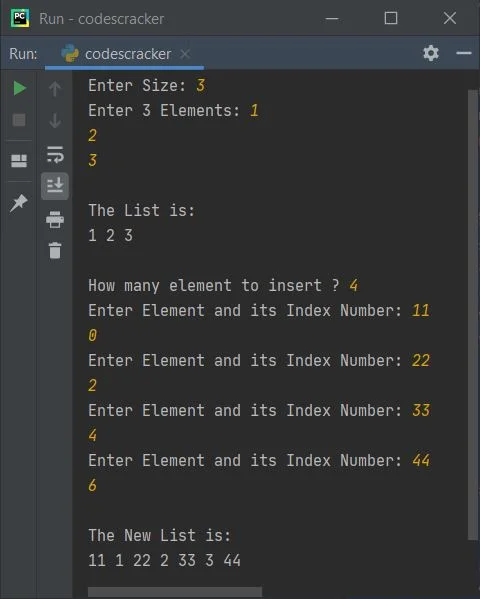
A Brief Description of the Above ProgramThe program is created in a way that:
The dry run with exactly the same user input as provided in the previous sample run goes like this: This is a value evaluation dry run. The output statement does not involve this dry run:
« Previous Program Next Program » Practice Quizzes
Test your programming and computer science knowledge with interactive MCQs and topic-based quizzes. Popular Topics
Explore the most popular programming and computer science tutorials on CodesCracker. |
| You are visitor 01402503 — GeezerVison does not store the pages you look up. Best viewed with Netscape Navigator 4.7 or Internet Explorer 6 at 800×600. No cookies required. |