GeezerVisonThe World Wide Web, restored to 800 pixels of glory. |
| Home|About|Gaming cabinet|Archives|How it works|Starter sites |
GeezerVison is showing codescracker.com — Python Program to Compare Two Strings
Python Program to Compare Two StringsIn this article, we've created some programs in Python to compare two strings entered by user at run-time. Here are the list of programs:
Compare Two Strings Character-by-CharacterTo compare two strings in Python, you have to ask from user to enter any two strings, then check whether the value of two strings are equal or not in character-by-character manner as shown in the program given below: print("Enter the First String: ") strOne = input() print("Enter the Second String: ") strTwo = input() lenOne = len(strOne) lenTwo = len(strTwo) if lenOne==lenTwo: i = 0 chk = 0 while i<lenOne: if strOne[i] != strTwo[i]: chk = 1 break i = i+1 if chk==0: print("\nStrings are Equal") else: print("\nStrings are Not Equal") else: print("\nStrings are Not Equal") Here is the sample run of above Python program to demonstrate its output. This is the initial output: 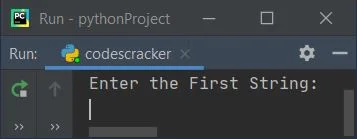
Now enter the first string say codescracker and press 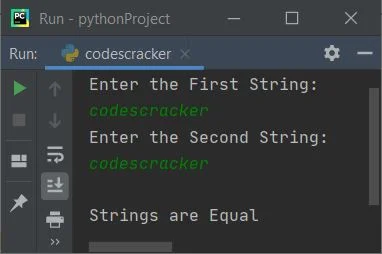
Here is another sample run with user input, codes as first and cracker as second string: 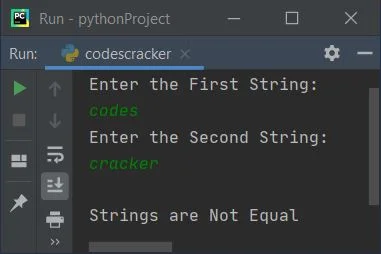
Previous Program ExplainedThe following two statements: lenOne = len(strOne) lenTwo = len(strTwo) is used to initialize the length of string stored in strOne to lenOne. Similarly, the length of second string gets initialized to lenTwo. For example, if user enters first string as codescracker and second string as same as first. Then the dry run of above program goes like:
Modified Version of Previous ProgramThis program uses end to skip printing of an automatic newline using print(). The str() method is used to convert any type of value to a string type. And \" is used to print ". Rest of the things are similar to previous program. print("Enter Two Strings: ", end="") sOne = input() sTwo = input() sOne = str(sOne) sTwo = str(sTwo) lOne = len(sOne) lTwo = len(sTwo) if lOne==lTwo: i = 0 chk = 0 while i<lOne: if sOne[i] != sTwo[i]: chk = 1 break i = i+1 if chk==0: print("\n\"" +sOne+ "\" = \"" +sTwo+ "\"") else: print("\n\"" +sOne+ "\" != \"" +sTwo+ "\"") else: print("\n\"" +sOne+ "\" != \"" +sTwo+ "\"") Here is its sample run with user input Welcome to CodesCracker as first and This is CodesCracker as second string: 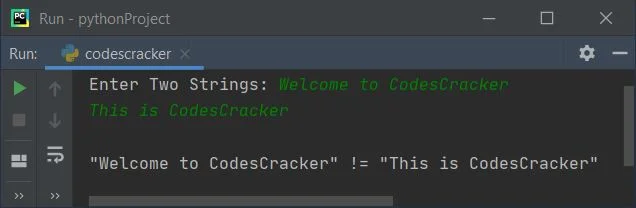
Compare Two Strings using for LoopThis program uses for loop instead of while loop to compare two strings in character-by-character manner. The range() method returns a sequence of values. By default, the value starts with 0 and increments by 1. It stops before a number specified as its argument: print("Enter Two Strings: ", end="") sOne = input() sTwo = input() sOne = str(sOne) sTwo = str(sTwo) lOne = len(sOne) lTwo = len(sTwo) if lOne==lTwo: chk = 0 for i in range(lOne): if sOne[i] != sTwo[i]: chk = 1 break if chk==0: print("\n\"" +sOne+ "\" = \"" +sTwo+ "\"") else: print("\n\"" +sOne+ "\" != \"" +sTwo+ "\"") else: print("\n\"" +sOne+ "\" != \"" +sTwo+ "\"") This program produces the same output as of previous program. Compare Two Strings using ListThis program uses list to compare two strings entered by user. That is, we've initialized the first string to a list named sOneList and checked the second string stored in sTwo using in, whether it is available in the list or not as shown in the program given here: print("Enter Two Strings: ", end="") sOne = input() sTwo = input() sOneList = [] sOneList = sOne if sTwo in sOneList: print("\nEqual Strings") else: print("\nUnequal Strings") Here is its sample run with user input python as first and python as second string: 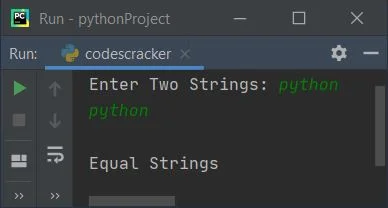
Compare Two Strings Directly using ==This is the shortest program to compare two strings in Python. This program uses == operator to do the job. print("Enter Two Strings: ", end="") sOne = input() sTwo = input() if sOne==sTwo: print("\nEqual Strings") else: print("\nUnequal Strings") Compare Two Strings using FunctionThis program uses a user-defined function named compareStrings() to compare two strings. That is, this function receives both strings as its argument and returns 1 if both strings are equal using == operator def compareStrings(x, y): if x==y: return 1 print("Enter Two Strings: ", end="") sOne = input() sTwo = input() chk = compareStrings(sOne, sTwo) if chk==1: print("\nEqual Strings") else: print("\nUnequal Strings") Compare Two Strings using ClassThis program uses class, an object-oriented feature of Python to do the same job. That is to compare two given strings by user: class CodesCracker: def compareStrings(self, x, y): if x==y: return 1 print("Enter Two Strings: ", end="") sOne = input() sTwo = input() obj = CodesCracker() chk = obj.compareStrings(sOne, sTwo) if chk==1: print("\nEqual Strings") else: print("\nUnequal Strings") We've created an object named obj of class CodesCracker to access its member function named compareStrings() through dot (.) operator. Same Program in Other Languages« Previous Program Next Program » Practice Quizzes
Test your programming and computer science knowledge with interactive MCQs and topic-based quizzes. Popular Topics
Explore the most popular programming and computer science tutorials on CodesCracker. |
| You are visitor 01402503 — GeezerVison does not store the pages you look up. Best viewed with Netscape Navigator 4.7 or Internet Explorer 6 at 800×600. No cookies required. |