GV

GeezerVison

The World Wide Web, restored to 800 pixels of glory.

Home|About|Gaming cabinet|Archives|How it works|Starter sites

On this site

  • CODESCRACKER
  • Python
  • Java
  • C++
  • JavaScript
  • SQL
  • Quiz
  • C
  • C#
  • HTML
  • CSS
  • PHP
  • Networking
  • Operating System

This view

  • Original page
  • New address

GeezerVison is showing codescracker.com — break statement in Python

  • Python Basics
  • Python Tutorial
  • Python Applications
  • Python Versions
  • Python environment setup
  • Python Basic Syntax
  • Python end (end=)
  • Python sep (sep=)
  • Python Comments
  • Python Identifiers
  • Python Variables
  • Python Operators
  • Python Ternary Operator
  • Python Operator Precedence
  • Python Control and Decision
  • Python Decision Making
  • Python if elif else
  • Python Loops
  • Python for Loop
  • Python while Loop
  • Python break Statement
  • Python continue Statement
  • Python pass Statement
  • Python break vs. continue
  • Python pass vs. continue
  • Python Built-in Types
  • Python Data Types
  • Python Lists
  • Python Tuples
  • Python Sets
  • Python frozenset
  • Python Dictionary
  • List vs. Tuple vs. Dict vs. Set
  • Python Numbers
  • Python Strings
  • Python bytes
  • Python bytearray
  • Python memoryview
  • Python Misc Topics
  • Python Functions
  • Python Variable Scope
  • Python Enumeration
  • Python import Statement
  • Python Modules
  • Python operator Module
  • Python os Module
  • Python Date and Time
  • Python Exception Handling
  • Python File Handling
  • Python Advanced
  • Python Classes and Objects
  • Python @classmethod Decorator
  • Python @staticmethod Decorator
  • Python Class vs. Static Method
  • Python @property Decorator
  • Python Keywords
  • Python Keywords
  • Python and
  • Python or
  • Python not
  • Python True
  • Python False
  • Python None
  • Python in
  • Python is
  • Python as
  • Python with
  • Python yield
  • Python return
  • Python del
  • Python from
  • Python lambda
  • Python assert
  • Python Built-in Functions
  • Python All Built-in Functions
  • Python print() Function
  • Python input() Function
  • Python int() Function
  • Python len() Function
  • Python range() Function
  • Python str() Function
  • Python ord() Function
  • Python chr() Function
  • Python read()
  • Python write()
  • Python open()
  • Python Examples
  • Python Examples

break statement in Python

This tutorial will go over the second most commonly used conditional statement in Python, "break." Here I've provided you with all the details about the "break" keyword or statement, along with some simple examples. This article deals with:

  • What is a "break" statement?
  • Syntax of the break statement
  • Examples of a break statement

What is a "break" statement?

The "break" statement in Python is used to exit a loop. In other words, we use the "break" keyword to terminate the remaining execution of the whole or complete loop in its indentation. Don't worry about the definition; you'll get to know everything about it after understanding the examples given below.

Syntax of the break statement

The syntax to use the "break" keyword is only the keyword itself. Therefore, its syntax is:

break

That's it. We do not need anything other than the keyword itself.

Examples of a break statement

Now let's have a look at some of the examples of the "break" keyword or statement. Let's start with the "break" statement in the while loop example.

break statement in the while loop

This program contains a break inside the while loop.

count = 0
while True:
    count = count+1
    if count>10:
        break
    print(count)

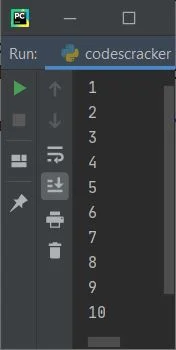
This program produces the output shown in the snapshot given below:
python break statement

As you can see from the above output, when the variable "count" becomes greater than 10, That is, when the value of "count" becomes 11, then the condition "count>10" evaluates to be "True," so the program flow goes inside the if's body and the statement "break" gets executed, which leaves the loop for further execution or simply terminates the remaining execution of the "while" loop.

Let's take another example of the "break" keyword or statement that helps a lot in understanding the benefit of using "break" in Python:

num = 2
while True:
    mul = 1
    print("\n-----Table of", num, "-------")
    while mul<=10:
        print(num, "x", mul, "=", num*mul)
        mul += 1
    print("\nWant to continue printing Table ? (y/n) ", end="")
    confirm = input()
    if confirm == 'n':
        break
    num += 1

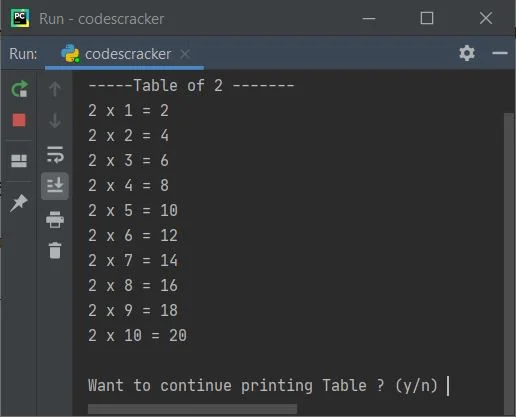
This is the initial output produced by the above program:
python break keyword

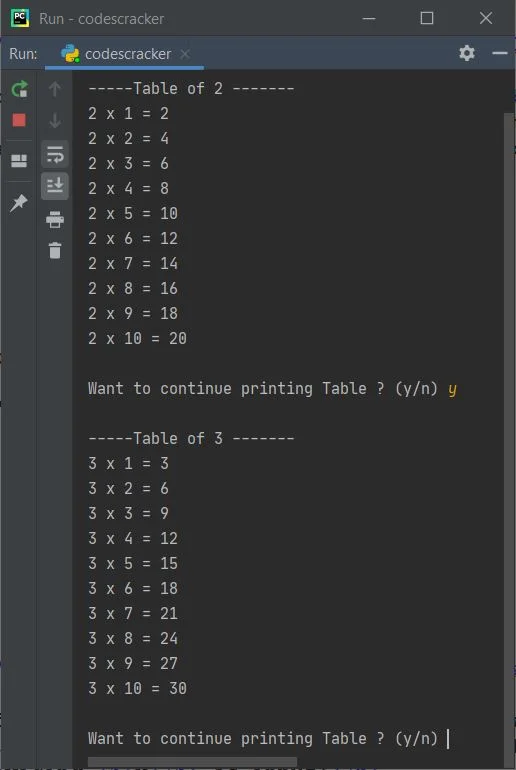
After printing table 2, the program prompts the user to choose whether to print the next table or skip or stop printing that table. To confirm, enter y to print the next table; otherwise, enter n to stop. For example, the output given below shows what is produced after providing y as input:
break keyword example python

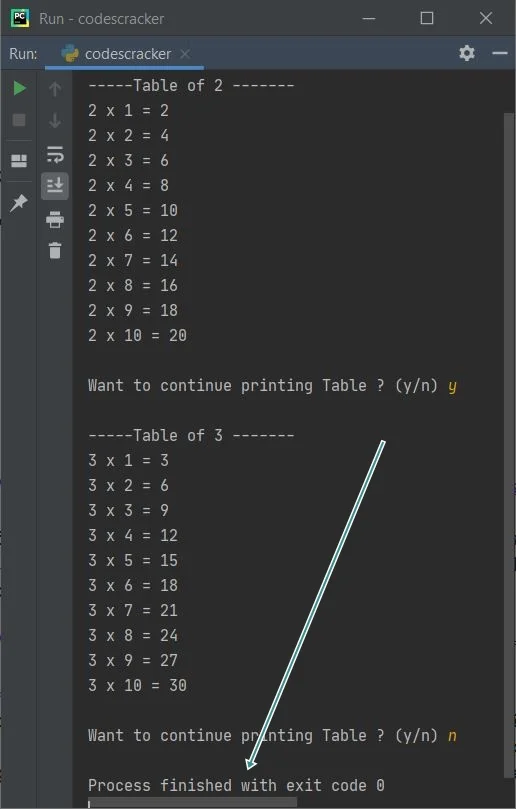
Since the condition of the while loop is given as true, that always evaluates to true, and the execution of the loop never ends until and unless you use the break keyword. And to do this, we have to enter n as input, so that the condition confirm=="n" evaluates to be True and the program flow goes inside the if's body and executes the break keyword, which helps in exiting or leaving the loop, as shown in the sample run given below:
python break keyword example program

break statement in the nested while loop

This program uses the break keyword in a while loop present inside another while loop:

count = 0
while count<10:
    count = count+1
    while count<5:
        if count==3:
            break
        count = count+1
    print(count)

This program produces the following output:
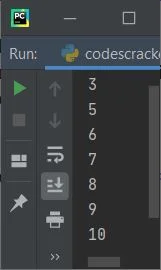
break statement in python

The following is how the above program is run:

  • First, "0" gets initialized to "count."
  • Now the condition "count<10" or "0<10" evaluates to true.
  • Therefore, program flow goes inside the body of the "while" loop.
  • Inside the body of the loop, the first statement, which is "count = count+1," gets executed.
  • Therefore, "count+1" or "0+1" or "1" gets initialized to "count."
  • Now the condition "count<5" or "1<5" evaluates to true.
  • Therefore, program flow goes inside the body of the loop (the inner "while" loop).
  • Furthermore, the condition "count == 3" or "1 == 3" evaluates to False.
  • Therefore, program flow does not go inside the body of the "if" block.
  • The statement "count = count+1" (inside the inner loop) gets executed.
  • That is, "count+1" or "1+1" or "2" gets initialized to "count."
  • All the statements of the inner loop get executed.
  • The program flow again evaluates the condition.
  • The condition "count<5" gets evaluated again.
  • This time, "count<5" or "2<5" evaluates to true.
  • Therefore, program flow again goes inside the loop.
  • And the condition "count == 3" or "2 == 3" again evaluates to false.
  • Now "count+1" or "2+1" or "3" gets initialized to "count."
  • Program flow again evaluates the condition of the inner loop. This process continues until the condition is evaluated as false.
  • That is, the condition "count<5" or "3<5" again evaluates to true.
  • Therefore, program flow again goes inside this loop.
  • But this time, the condition of "if,"  that is, "count == 3" or "3 == 3," evaluates to true.
  • Therefore, program flow goes inside this "if's" body.
  • And using the "break" keyword, we've left the loop (the inner "while" loop).
  • That is, using "break,"  the remaining execution of its nearest parent loop gets terminated or stopped.
  • After exiting the loop, using the "print()" statement, the value of "count" gets printed. That is "3."
  • As all the statements of the outer "while" loop get executed
  • Therefore, its condition again gets evaluated. This process continues until the condition is evaluated as false.
  • That is, the condition "count<10" or "3<10" evaluates to true again.
  • Therefore, program flow again goes inside the loop, and "count+1" or "3+1" or "4" gets initialized to "count."
  • And the condition of the inner loop, "count<5", gets evaluated.
  • That is, the condition "count<5" or "4<5" evaluates to true.
  • Therefore, program flow inside this inner loop
  • Inside this loop, the condition (of "if") "count==3" or "4==3" evaluates to false.
  • Therefore, program flow does not go inside its body. The value of "count" is incremented.
  • That is, the value of "count" now equals 5.
  • And this time the condition of the inner loop, which is "count<5" or "5<5", evaluates to false.
  • Therefore, the inner "while" loop's execution stops now. Because the condition will now evaluate to false every time.
  • Now, the values 5 to 10 are printed one by one on the output.
  • That is, the values "1," "2," and "4" do not get printed.

break statement in the for loop

The program given below uses a break statement in a for loop:

for i in range(10000000):
    if i==5:
        break
    print(i)

Here is its sample output:
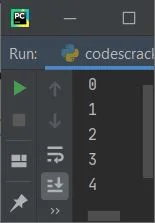
python break statement example

As you can see, using the break statement, I've stopped the remaining execution of the loop when the value of i becomes equal to 5.

Let's take another example that shows you the most important use of the break statement:

nums = list()
print("Enter 5 numbers: ")
for i in range(5):
    nums.append(int(input()))

print("\nEnter a number to search: ")
n = int(input())

for i in range(5):
    if n==nums[i]:
        print("\nItem found at Position:", i+1)
        break

Here is its sample run with user inputs: 11, 22, 33, 44, 55 as five numbers, and 22 as the number to search for:
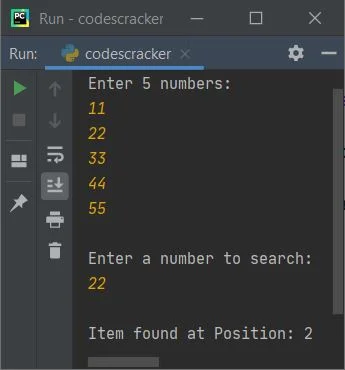
break keyword in python

Note: The break keyword helps a lot to prevent the unwanted execution of codes. As you can see from the above program, when our work was completed, i.e. when the element was discovered, then we don't need to execute or search for any further elements. Therefore, using the break keyword, we simply exit from the loop. That's it.

Python Online Test


« Previous Tutorial Next Tutorial »
Practice Quizzes

Test your programming and computer science knowledge with interactive MCQs and topic-based quizzes.

All Quizzes SQL Quiz Python Quiz Java Quiz C++ Quiz
Popular Topics

Explore the most popular programming and computer science tutorials on CodesCracker.

Python Tutorial Java Tutorial C++ Tutorial SQL Tutorial JavaScript Tutorial HTML Tutorial CSS Tutorial Computer Networking
You are visitor 01402503 — GeezerVison does not store the pages you look up.
Best viewed with Netscape Navigator 4.7 or Internet Explorer 6 at 800×600. No cookies required.