GeezerVisonThe World Wide Web, restored to 800 pixels of glory. |
| Home|About|Gaming cabinet|Archives|How it works|Starter sites |
GeezerVison is showing codescracker.com — Data Types in Python
Data Types in PythonData types in Python are basically attributes of data that tell the compiler or interpreter how to interpret their value. For example, if we have numeric types of data, that means that it can be used to perform arithmetic operations. Python 7 Built-in Data TypesThe data type represents the type of value and determines how the value can be used in a Python program. Here is the list of seven built-in data types:
Let's go over each of these seven built-in data types in detail, complete with example programs. But before starting, let's first understand how we can get the type of data that a variable holds. How to Determine the Data Type of an Object (Variable)To find and print the type of data that a variable holds in Python, we need to use the "type()" method. Here is an example program that demonstrates it: myvar = 10 print(type(myvar)) The output produced by the above Python program is shown in the snapshot given below: 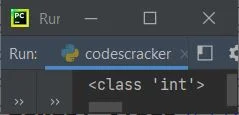
As you can see from the above output, because the variable "myvar" holds a value of 10, which is an integer value, the output produced says the variable "myvar" is of the class "int." Python text data typeThe "str" class comes under the category of text data types in Python. This data type holds all the string values. Here is an example: myvar = 'c' print(type(myvar)) myvar = "c" print(type(myvar)) myvar = "codescracker.com" print(type(myvar)) myvar = "Hey, What's Up!" print(type(myvar)) Here is its sample output: 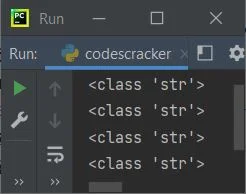
The above program can also be created as: a, b, c, d = 'c', "c", "codescracker.com", "Hey, What's Up!" print(type(a)) print(type(b)) print(type(c)) print(type(d)) You'll get the same output as the previous program's output. Python Numeric Data TypesUnder the category of numeric data types, we have:
Here is an example program that uses numeric data types. I've used three variables with three different numeric types such as int, float, and complex: a, b, c = 123, 3.49, 95.4j print(type(a)) print(type(b)) print(type(c)) The output produced by the above program will be: <class 'int'> <class 'float'> <class 'complex'> Python Sequence Data TypesThis is yet another important data type that we must be aware of. This data type deals with values in sequence. A sequence allows us to store multiple values of the same or different types in the same variable. These are the types of sequences listed:
Note: To learn about these three topics in detail, refer to their separate tutorials. Let's take an example that uses all these three types of sequence in Python: var = [1, "codescracker", True, 23.4, 234] print(type(var)) var = (1, "codescracker", True, 23.4, 234) print(type(var)) var = range(10) print(type(var)) The output produced by the above program will be: <class 'list'> <class 'tuple'> <class 'range'> Python Mapping Data TypeThe dictionary comes under the category of mapping data types in Python. Each item in the dictionary is a pair of key and value. Since every item (element) is a key-value pair, it falls under the category of mapping data type. Like lists, the dictionary is also mutable. Here is an example showing the mapping type in Python: var = {'day': 'Thursday', 'month': 'September', 'year': '2021'}
print(type(var))
var = {1: 'day', 2: 'month', 3: 'year'}
print(type(var))
Now the output produced by the above program will be: <class 'dict'> <class 'dict'> Python Set Data TypesUnder this data type category, we have basically two types: Here is the list of these two types:
Here is an example that uses both types. var = {"Liam", "Noah", "Oliver"}
print(type(var))
var = ["Elijah", "William", "Benjamin", "Lucas"]
var = frozenset(var)
print(type(var))
Now, if you execute this program, then the output produced will exactly look like this: <class 'set'> <class 'frozenset'> Python Boolean Data TypeThe boolean data type is used when we need to evaluate one of the two possible values, say, True or False. Here is an example that demonstrates the boolean data type in Python: var = True print(type(var)) var = False print(type(var)) print(type(True)) print(type(False)) The output produced by the above Python program demonstrating the boolean data type will be: <class 'bool'> <class 'bool'> <class 'bool'> <class 'bool'> Python Binary Data TypesMost of the time, binary data types in Python are used to improve performance. Here is the list of three binary types:
Here is an example that demonstrates these three binary types. var = b"codescracker" print(type(var)) var = bytes("codescracker", "utf-8") print(type(var)) var = bytearray(10) print(type(var)) var = memoryview(bytes(10)) print(type(var)) The snapshot given below shows the sample output produced by the above Python program: 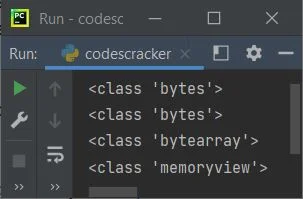
From the above program, consider the following statement: var = bytes("codescracker", "utf-8") encodes the string "codescracker" using the "utf-8" encoding method. Mega Program on Python Data TypesThis is the last example program, covering all the data types in Python. First, I initialized all types of values to some variables, then printed the values and types. Let's take a look: a = 'c' b = "c" c = "codescracker" d = 12 e = 43.93 f = 43j g = ["Henry", "Alexander"] h = ("Mason", "Michael", "Ethan") i = range(5) j = {"Name": "Daniel", "Age": 38} k = {"Owen", "Aiden"} l = frozenset(g) m = True n = False o = bytes(c, "utf-8") p = bytearray(b, "utf-8") q = bytearray(c, "utf-8") r = memoryview(bytes(d)) s = memoryview(bytes(c, "utf-8")) t = memoryview(bytearray(d)) u = memoryview(bytearray(c, "utf-8")) print("--------------------------------------------------------------------") print("Variable\t Value\t\t\t\t\t\t\t\t Type") print("--------------------------------------------------------------------") print("a\t\t\t", a, "\t\t\t\t\t\t\t\t\t", type(a)) print("b\t\t\t", b, "\t\t\t\t\t\t\t\t\t", type(b)) print("c\t\t\t", c, "\t\t\t\t\t\t", type(c)) print("d\t\t\t", d, "\t\t\t\t\t\t\t\t", type(d)) print("e\t\t\t", e, "\t\t\t\t\t\t\t\t", type(e)) print("f\t\t\t", f, "\t\t\t\t\t\t\t\t", type(f)) print("g\t\t\t", g, "\t\t\t", type(g)) print("h\t\t\t", h, "\t\t", type(h)) print("i\t\t\t", i, "\t\t\t\t\t\t", type(i)) print("j\t\t\t", j, "\t\t", type(j)) print("k\t\t\t", k, "\t\t\t\t\t", type(k)) print("l\t\t\t", l, "\t", type(l)) print("m\t\t\t", m, "\t\t\t\t\t\t\t\t", type(m)) print("n\t\t\t", n, "\t\t\t\t\t\t\t\t", type(n)) print("o\t\t\t", o, "\t\t\t\t\t", type(o)) print("p\t\t\t", p, "\t\t\t\t\t", type(p)) print("q\t\t\t", q, "\t\t", type(q)) print("r\t\t\t", r, "\t", type(r)) print("s\t\t\t", s, "\t", type(s)) print("t\t\t\t", t, "\t", type(t)) print("u\t\t\t", u, "\t", type(u)) There are so many horizontal tabs 😀. The snapshot given below shows the sample output produced by this mega-program on data types in Python: 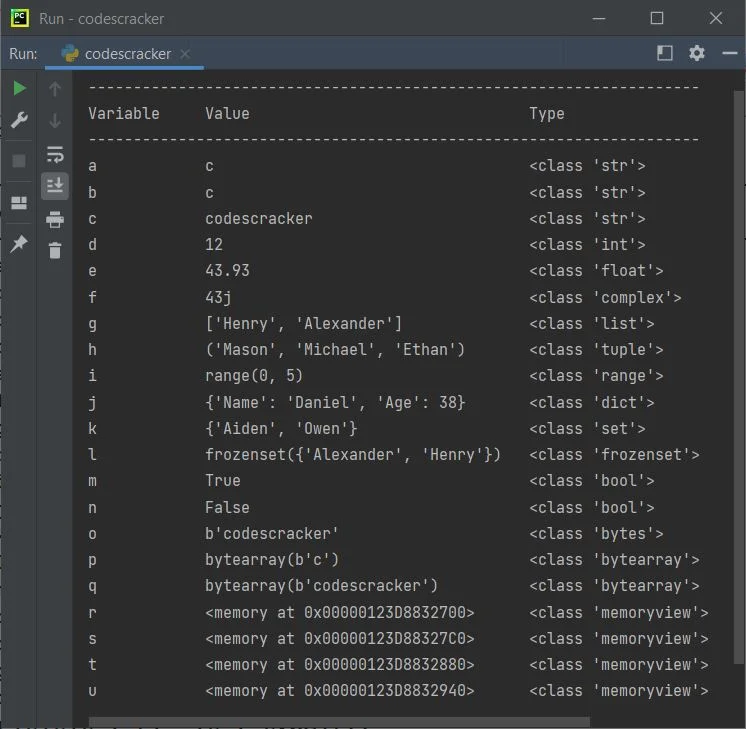
More Examples« Previous Tutorial Next Tutorial » Practice Quizzes
Test your programming and computer science knowledge with interactive MCQs and topic-based quizzes. Popular Topics
Explore the most popular programming and computer science tutorials on CodesCracker. |
| You are visitor 01402503 — GeezerVison does not store the pages you look up. Best viewed with Netscape Navigator 4.7 or Internet Explorer 6 at 800×600. No cookies required. |