GeezerVisonThe World Wide Web, restored to 800 pixels of glory. |
| Home|About|Gaming cabinet|Archives|How it works|Starter sites |
GeezerVison is showing codescracker.com — Python False keyword
Python False keywordThe "False" keyword in Python is basically a Boolean value, the result of a comparison operation, or the result of any other logical expression whose value evaluates in the form of True or False. For example: x = 10 y = 20 print(x==y) print(x>y) The output is: False False Note: Python is a case-sensitive language. As a result, keep the first letter of the "False" keyword in capital letters and the remaining letters in small letters. In logical expressions and conditional statements, the value "False" corresponds to the boolean value False. A variable or function name containing the word "False" is prohibited by Python's naming conventions. In Python, there are two boolean values: True and False. In order to determine whether or not a given condition holds true, Boolean values are often combined with comparison operators (such as ==, <, >, etc.). Python False keyword exampleHere is an example of the "False" keyword in Python: print("Enter any Two Values: ", end="") a = input() b = input() x = a==b if x: print("\nBoth values are equal") else: print("\nBoth values are not equal") print("\nThe value of x =", x) The sample run with user input of 500 as the first number and 600 as the second number is shown in the snapshot given below: 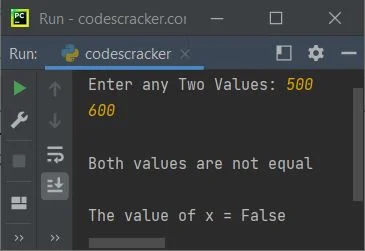
Advantages of the "False" keyword in Python
Disadvantages of the "False" keyword in Python
« Previous Tutorial Next Tutorial » Practice Quizzes
Test your programming and computer science knowledge with interactive MCQs and topic-based quizzes. Popular Topics
Explore the most popular programming and computer science tutorials on CodesCracker. |
| You are visitor 01402503 — GeezerVison does not store the pages you look up. Best viewed with Netscape Navigator 4.7 or Internet Explorer 6 at 800×600. No cookies required. |