GeezerVisonThe World Wide Web, restored to 800 pixels of glory. | ||||||||||||||||||||||||||||||||||||||||
| Home|About|Gaming cabinet|Archives|How it works|Starter sites | ||||||||||||||||||||||||||||||||||||||||
GeezerVison is showing codescracker.com — String in Python with Examples
String in Python with ExamplesStrings are used to represent text, which is a combination of characters, regardless of the type of characters. Therefore, strings can also store a value that contains numbers. But the question is, how can we identify whether the value is of the string (str) type or not? The answer is: anything enclosed within a single or double quote is a string. For example: x = 'codescracker' print(type(x)) x = 'Python is Fun' print(type(x)) x = "134" print(type(x)) x = '243.554' print(type(x)) x = 'Python@134' print(type(x)) The output is: <class 'str'> <class 'str'> <class 'str'> <class 'str'> <class 'str'> Note: The type() function is used to find the type of a value or variable. Strings are a contiguous set of characters enclosed within a single or double quotation mark. In this post, I have covered the following topics regarding the string in Python:
Assign a string in PythonTo assign a string in Python, follow the program given below: a = 'Welcome to codescracker.com' b = "Python is Fun!" How to Assign a Multiline String in PythonWe need to use a large string value that expands into multiple lines on occasion. Therefore, to assign a multiline string, we need to enclose the string in three single or double quotes. For example: a = '''This is Lukas. I'm from Berlin. I studied at the Ludwig Maximilian University of Munich. I am a data science enthusiast.''' print(a) The output should be: This is Lukas. I'm from Berlin. I studied at the Ludwig Maximilian University of Munich. I am a data science enthusiast. If you place some space before the string, other than the variable's line, Then the space will be considered part of the string. For example: a = """Hey, Python is fun. Is not it?""" print(a) The output should be: Hey,
Python is fun.
Is not it?
Access the elements (characters) of a string in PythonCharacters in a string can be accessed using their index numbers. Therefore, just like a list, a string is also an iterable object. The syntax to access an element or character of a string in Python is: x[index] where "x" refers to the string, and "index" refers to the index number of the character or element that needs to be accessed. For example: x = "Python is easy to learn" print(x[0]) print(x[1]) print(x[2]) The output is: P y t Access String Elements from the EndAn element of a string can also be accessed using, of course, negative indexing. The "x[-1]" refers to the last character of string "x." For example: x = "Python is easy to learn" print(x[-1]) print(x[-2]) print(x[-3]) The output is: n r a The last element can also be accessed using: print(x[len(x)-1]) The len() function returns the length of x. But it is not recommended to use the above code to access the last character of a string. It is preferable to use print(x[-1]). Iterate over a string using the Python for loopA for loop can also be used to iterate over the string. For example: mystr = "Python Robust" for c in mystr: print(c) The output is: P y t h o n R o b u s t To print all the characters of a string on a single line while iterating using the for loop, replace the following statement from the above program: print(c)
with the statement given below: print(c, end="") Now the output is: Python Robust Note: The end= parameter skips the insertion of an automatic newline after each print(). Python string lengthThe len() function is used to get the length of a string. For example: print("Enter a String: ", end="") x = input() print("\nLength =", len(x)) The snapshot given below shows the sample run of the above program, with user input "I'm from Berlin" as a string: 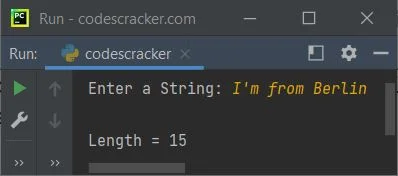
String splitting (slicing) in PythonThe following program and its output demonstrate how the string gets split in Python: x = "Python is Awesome!" print(x[0]) print(x[1:5]) print(x[1:6]) print(x[0:6]) print(x[7:]) The output is: P ytho ython Python is Awesome! While splitting the string in Python, using: string[indexStart:indexStop] The indexStart is included, whereas the indexStop is excluded. Python escape sequence charactersThe following table briefly describes the escape sequence characters used in Python:
Example of Python Escape Sequence CharactersHere is an example program that uses some of the escape sequence characters in Python. print("\t\t\tPython String") print("\t\t\t \\ \\ \\ \\ \\ \\ \\") print("\t\t\t\tby") print("\t\t\tcodescracker.com") print("\t\t\t \\ \\ \\ \\ \\ \\ \\") print("\nThanks to all Python programmer,") print("who are visiting \"codescracker.com\" to improve the skill.") The snapshot given below shows the sample output produced by the above program, demonstrating the use of escape sequence characters in Python: 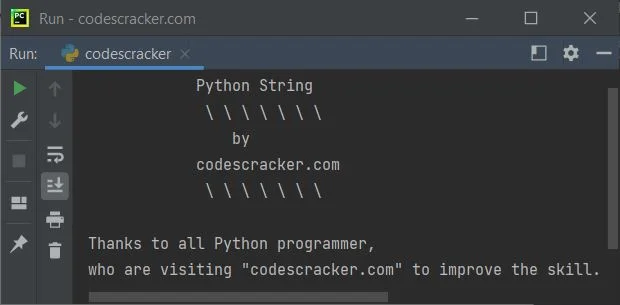
In Python, repeat a string for n timesTo repeat a string n times, simply multiply it by the value of n, for example, multiply by 2 to repeat the string twice, and multiply by 3 to repeat the string three times. For example: print("Enter the String: ", end="") x = input() print("Enter the Number of times to Repeat: ", end="") t = int(input()) x = x*t print("\nNow the String is:") print(x) The sample run with user input "codescracker" as a string and 5 as the number of times to repeat "codescracker" is shown in the snapshot given below: 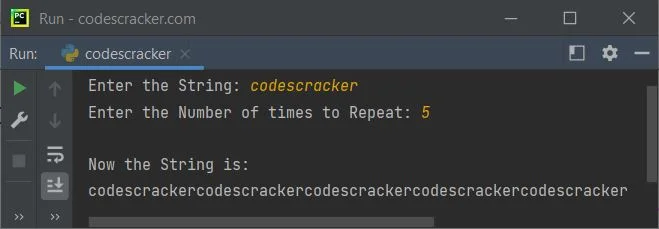
Python string methodsThe pre-defined or built-in methods used to handle the string in Python are:
Python string programsHere is a list of some recommended programs related to string handling in Python.
« Previous Tutorial Next Tutorial » Practice Quizzes
Test your programming and computer science knowledge with interactive MCQs and topic-based quizzes. Popular Topics
Explore the most popular programming and computer science tutorials on CodesCracker. | ||||||||||||||||||||||||||||||||||||||||
| You are visitor 01402503 — GeezerVison does not store the pages you look up. Best viewed with Netscape Navigator 4.7 or Internet Explorer 6 at 800×600. No cookies required. |