GV

GeezerVison

The World Wide Web, restored to 800 pixels of glory.

Home|About|Gaming cabinet|Archives|How it works|Starter sites

On this site

  • CODESCRACKER
  • Python
  • Java
  • C++
  • JavaScript
  • SQL
  • Quiz
  • C
  • C#
  • HTML
  • CSS
  • PHP
  • Networking
  • Operating System

This view

  • Original page
  • New address

GeezerVison is showing codescracker.com — Python in Keyword

  • Python Basics
  • Python Tutorial
  • Python Applications
  • Python Versions
  • Python environment setup
  • Python Basic Syntax
  • Python end (end=)
  • Python sep (sep=)
  • Python Comments
  • Python Identifiers
  • Python Variables
  • Python Operators
  • Python Ternary Operator
  • Python Operator Precedence
  • Python Control and Decision
  • Python Decision Making
  • Python if elif else
  • Python Loops
  • Python for Loop
  • Python while Loop
  • Python break Statement
  • Python continue Statement
  • Python pass Statement
  • Python break vs. continue
  • Python pass vs. continue
  • Python Built-in Types
  • Python Data Types
  • Python Lists
  • Python Tuples
  • Python Sets
  • Python frozenset
  • Python Dictionary
  • List vs. Tuple vs. Dict vs. Set
  • Python Numbers
  • Python Strings
  • Python bytes
  • Python bytearray
  • Python memoryview
  • Python Misc Topics
  • Python Functions
  • Python Variable Scope
  • Python Enumeration
  • Python import Statement
  • Python Modules
  • Python operator Module
  • Python os Module
  • Python Date and Time
  • Python Exception Handling
  • Python File Handling
  • Python Advanced
  • Python Classes and Objects
  • Python @classmethod Decorator
  • Python @staticmethod Decorator
  • Python Class vs. Static Method
  • Python @property Decorator
  • Python Keywords
  • Python Keywords
  • Python and
  • Python or
  • Python not
  • Python True
  • Python False
  • Python None
  • Python in
  • Python is
  • Python as
  • Python with
  • Python yield
  • Python return
  • Python del
  • Python from
  • Python lambda
  • Python assert
  • Python Built-in Functions
  • Python All Built-in Functions
  • Python print() Function
  • Python input() Function
  • Python int() Function
  • Python len() Function
  • Python range() Function
  • Python str() Function
  • Python ord() Function
  • Python chr() Function
  • Python read()
  • Python write()
  • Python open()
  • Python Examples
  • Python Examples

Python in Keyword

The "in" keyword in Python is used when we need either:

  1. to check whether a particular value is available in a sequence such as a list, tuple, etc. or not.
  2. or to traverse a sequence in for loop

For example:

x = [12, 23, 65, 87]
if 23 in x:
    print("23 is available in the list 'x'")
else:
    print("23 is not available in the list 'x'")

print("\nAll elements of list 'x':")
for e in x:
    print(e)

The output of the above program is shown in the screenshot below to show how the "in" keyword works in Python:
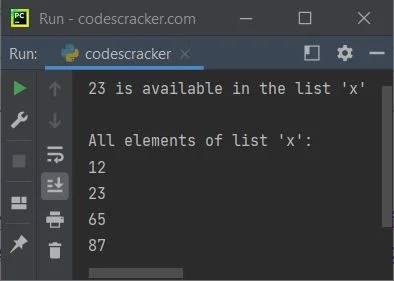
python in keyword

Note: Python is a case-sensitive language; therefore, keep both the letters of "in" in small letters.

Python in Keyword Example

Here is an example of the "in" keyword in Python:

x = (134, 54, 65, 67, 0, 23)
print("Enter a Number: ", end="")
num = int(input())
if num in x:
    print("\nThe number is available")
else:
    print("\nThe number is not available")

print("\nEnter a String: ", end="")
str = input()
print("\nCharacters of given string are:")
for c in str:
    print(c)

A sample run with user input 66 as a number and Python as a string is shown in the snapshot given below:
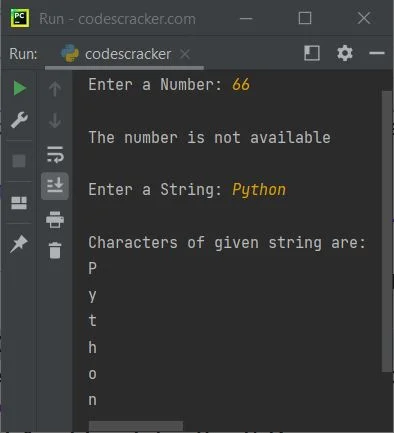
python in keyword example

The "in" keyword can be thought of as a membership operator that returns True or False depending on whether or not the value is in the container.

Advantages of the "in" keyword in Python

  • It's a clear way to check a container's value.
  • It works with Python lists, tuples, sets, and dictionaries.
  • It makes conditional statements and loops more efficient and readable.

Disadvantages of the "in" keyword in Python

  • For large datasets, searching for a value in a container with the "in" keyword can be slow. Binary search or hash tables may be faster.
  • It can only check for a value in a container, not its location or frequency.
  • It may not work with custom classes or objects, which may require custom "in" implementation.

Python Online Test


« Previous Tutorial Next Tutorial »
Practice Quizzes

Test your programming and computer science knowledge with interactive MCQs and topic-based quizzes.

All Quizzes SQL Quiz Python Quiz Java Quiz C++ Quiz
Popular Topics

Explore the most popular programming and computer science tutorials on CodesCracker.

Python Tutorial Java Tutorial C++ Tutorial SQL Tutorial JavaScript Tutorial HTML Tutorial CSS Tutorial Computer Networking
You are visitor 01402503 — GeezerVison does not store the pages you look up.
Best viewed with Netscape Navigator 4.7 or Internet Explorer 6 at 800×600. No cookies required.