GeezerVisonThe World Wide Web, restored to 800 pixels of glory. | ||||||||||||||||||||||||||||
| Home|About|Gaming cabinet|Archives|How it works|Starter sites | ||||||||||||||||||||||||||||
GeezerVison is showing codescracker.com — Python set with examples
Python set with examplesThis article provides you with an easy way to learn all about "sets" in Python with the help of not only theory but also example programs and their respective outputs. This article deals with:
Set definition in PythonSet, like List, Tuple, and Dictionary, uses a single variable to store one or more elements (of any data type).In other words, we can say that a set is a data type that can be used to store collections of data or multiple items. Set syntax in PythonSet items must be written in curly braces, as shown in the sample code below: marks = {89, 87, 92, 67}
Precautions for Using Curly BracesIf you use curly braces to initialize an empty set, then it gets treated as a dictionary. Therefore, use the set() constructor to do the job. Here is an example: my_set_one = {}
print(type(my_set_one))
my_set_two = set()
print(type(my_set_two))
Here is its sample output: 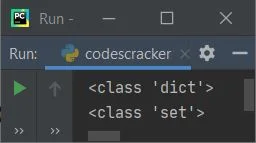
Note: The type() method returns the type of the variable passed as its argument. Set items are unorderedUnlike List, Tuple, and Dictionary, Set items are unordered. That is, if you print the set, then you'll get all the items in the set, but in a random order, as shown in the sample output produced by the program given below: marks = {89, 87, 92, 67, 78, 94}
print(marks)
Here is its sample output: 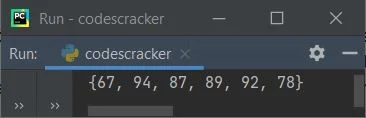
As you can see, the original order of the set is 89, 87, 92, 67, 78, and 94, but the output's order is 67, 94, 87, 89, 92, and 78. Set items can not be indexedSet items, unlike lists and tuples, cannot be accessed via their indexes.Therefore, sets in Python do not support any type of slicing operation. Set items are unchangeableLike tuples, set items are also unchangeable. That is, after initializing the set items, we cannot change the item. Set items do not allow duplicate valuesSet, like Dictionary, does not allow duplicate values. The program given below demonstrates it: marks = {89, 87, 94, 87}
tmarks = marks
print(tmarks)
Here is its sample output: 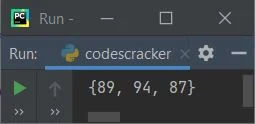
As you can see, the mark 87 appears twice in the same set; therefore, one 87 gets removed automatically. Using Set, extract unique elements from a listSince sets do not allow duplicates, we can use sets to extract all the unique elements from a list, as done in the program given below: places = ["NewYork", "California", "NewYork", "Los Angles", "California"] unique_places = set(places) print("\nUnique Places are:", unique_places) Here is its sample output: 
To remove all duplicates and return another list, use the following code: list(set(places))
In the above code, the list named "places" gets converted into a set. As a result, the set removes duplicates and is converted back into a list.So the variable places are now a list of only unique elements. Adding new items to a set in PythonIt is possible to add new items to a set. The program given below illustrates how to add new items to an already created set. marks = {89, 87, 92, 67, 78, 94}
print(marks)
marks.add(99)
print(marks)
The snapshot given below shows the output produced by the above Python program: 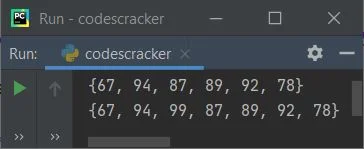
The add() method helps to add new items to the set. The set() constructor in PythonIn place of curly braces, the set() constructor can also be used to define a set, as shown in the program given below: marks = set((89, 87, 94)) print("My Marks are:", marks) The image below shows an example of the output this Python program produces: 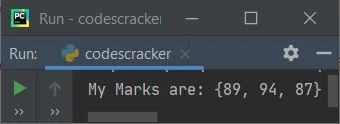
Important: Remember the double (()) or brackets. Set operations in PythonWith the help of sets in Python, we can perform:
of any two sets, just as in mathematics. The following program illustrates and demonstrates all four well-known set operations: set_one = {1, 2, 3, 4, 5}
set_two = {2, 5, 7, 8, 9}
print("\n------------Union of Two Sets------------------------")
print(set_one, "|", set_two, "=", set_one | set_two)
print("\n------------Intersection of Two Sets-----------------")
print(set_one, "&", set_two, "=", set_one & set_two)
print("\n------------Difference of Two Sets-------------------")
print(set_one, "-", set_two, "=", set_one - set_two)
print("\n------------Symmetric Difference of Two Sets---------")
print(set_one, "^", set_two, "=", set_one ^ set_two)
This program produces the output that looks like: 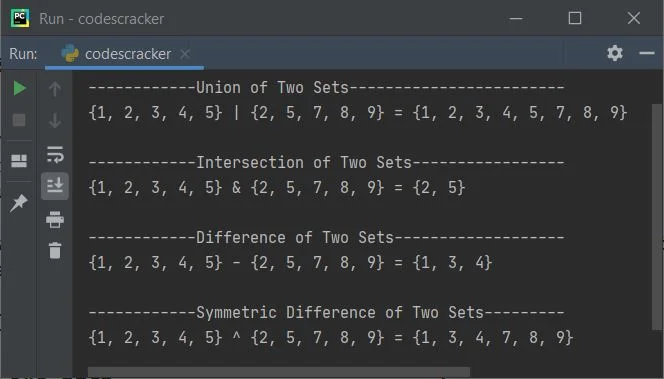
The other two famous operations on the sets are checking "issubset" and "issuperset." The table given below shows methods and their equivalent operators used to perform operations on sets, supposing a and b are two sets:
Python Set ExampleHere is an example of sets in Python: mysets = {1, 2, (3, 4, 5), 6, (7, 8), (9, 10)}
print(mysets)
Here is its sample output: 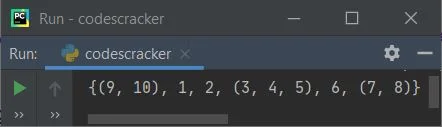
Set example with items of multiple data typesThe example program given below on sets shows a set with items of multiple data types that are of string, boolean, and int types: student_detail = {"codescracker", True, 100}
print(student_detail)
Here is its sample output: 
Add multiple elements to a setNow the program given below shows how to add multiple elements to a set. The user must enter the element's size and the element itself at run-time, as shown in the program and sample run below: myset = {1, 2, 3}
print("-------Original Set-------")
print(myset)
print("\nHow many elements to add in the set ?")
tot = int(input())
print("Enter", tot, "elements:")
for i in range(tot):
val = input()
myset.add(val)
print("\n--------New Set-----------")
print(myset)
Here is its sample output after providing exactly 4 as "How many elements to add in the set?" and then 100, 200, 300, and 400 as four elements to add: 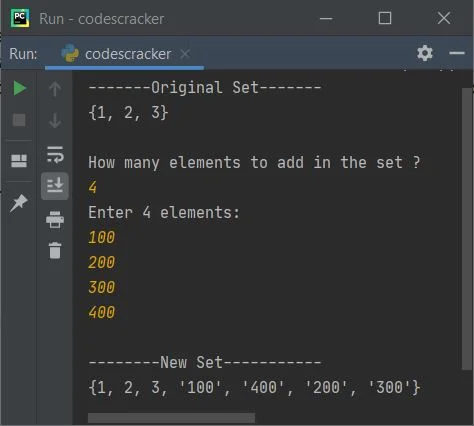
Note: You're seeing the entered element added as a string data type because, while receiving the input using the input() method, we haven't used the int() method to convert the input value to an integer type. That is, anything received using input() gets treated as a string type by default. Add two sets in PythonAlong with the addition of new items to the set, we can also add the whole set to another set. To do this job, the update() method helps to join two sets, as shown in the program given below: first_sem_marks = {89, 87, 94}
print(first_sem_marks)
second_sem_marks = {90, 93, 70}
first_sem_marks.update(second_sem_marks)
print(first_sem_marks)
Here is its sample output: 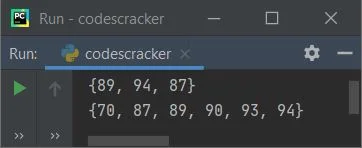
Find the length of a set in PythonThe len() method is available in Python to achieve the goal of finding and printing the length of a set. Here is an example program that illustrates it: student_detail = {"codescracker", "Programmer", True, 100}
print("Set Items:", student_detail)
print("Set Length:", len(student_detail))
This program produces the output as shown in the snapshot given below: 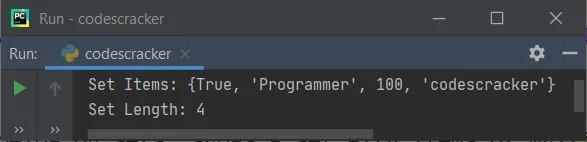
Check if an element is available in SET or notThe program given below shows how to check whether an element is available in the set or not: myset = {1, 2, 3}
print("Enter an Element to check: ")
val = int(input())
if val in myset:
print(val, "is available in the Set")
else:
print(val, "is not available in the Set")
Here is its sample run with user input of "3" 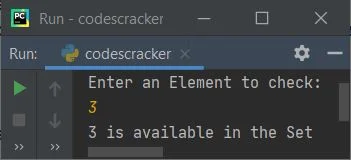
Remove an element from a set in PythonPython provides two methods to do the job of removing an element from a set. The two methods are remove() and discard(). The following program is an example of using both methods to remove an element from a set: myset = {1, 2, 3, 4, 5}
print("------Original Set------")
print(myset)
myset.discard(5)
print("-----Set after removing 5------")
print(myset)
myset.remove(2)
print("-----Set after removing 2------")
print(myset)
The snapshot given below shows the sample output produced by this program: 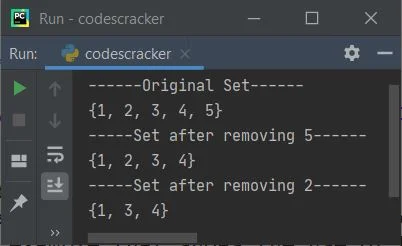
To remove any random elements from the set, use the pop() method. And to remove all the items from a set, use the clear() method. The example program given below uses and illustrates these two methods: myset = {1, 2, 3, 4, 5}
print("------Original Set------")
print(myset)
myset.pop()
print("-----Set after popping------")
print(myset)
myset.clear()
print("-----Set after clearing-----")
print(myset)
The output of this Python program is: 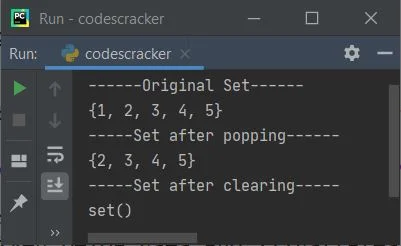
« Previous Tutorial Next Tutorial » Practice Quizzes
Test your programming and computer science knowledge with interactive MCQs and topic-based quizzes. Popular Topics
Explore the most popular programming and computer science tutorials on CodesCracker. | ||||||||||||||||||||||||||||
| You are visitor 01402503 — GeezerVison does not store the pages you look up. Best viewed with Netscape Navigator 4.7 or Internet Explorer 6 at 800×600. No cookies required. |