GeezerVisonThe World Wide Web, restored to 800 pixels of glory. |
| Home|About|Gaming cabinet|Archives|How it works|Starter sites |
GeezerVison is showing www.tutorialspoint.com — Java if-else Statement 
Selected Reading
Java if-else StatementIn Java, the The if StatementThe The if-else StatementThe Using if-else statements in Java improves decision-making in programs by executing different code paths based on conditions. Syntax of if-else StatementFollowing is the syntax of an if...else statement − if(Boolean_expression) {
// Executes when the Boolean expression is true
}else {
// Executes when the Boolean expression is false
}
If the boolean expression evaluates to true, then the if block of code will be executed, otherwise else block of code will be executed. Flow DiagramBelow is the flowchart of the if-else statement, illustrating how it works: 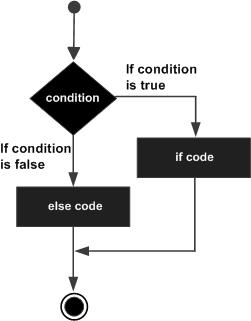
Example of if else StatementIn this example, we're showing the usage of if else statement. We've created a variable x and initialized it to 30. Then in the if statement, we're checking x with 20. As if statement is false, the statement within the else block is executed. public class Test {
public static void main(String args[]) {
int x = 30;
if( x < 20 ) {
System.out.print("This is if statement");
}else {
System.out.print("This is else statement");
}
}
}
When the above code is compiled and executed, it produces the following result − This is else statement Ladder if (if else if) StatementsThe if...else if...else statement is used for executing multiple code blocks based on the given conditions (Boolean expressions). An if statement can be followed by an optional else if...else statement, which is very useful to test various conditions using a single if...else if statement. Points to RememberWhen using if-else if- else statements there are a few points to keep in mind.
SyntaxFollowing is the syntax of an if...else if...else statement − if(Boolean_expression 1) {
// Executes when the Boolean expression 1 is true
}else if(Boolean_expression 2) {
// Executes when the Boolean expression 2 is true
}else if(Boolean_expression 3) {
// Executes when the Boolean expression 3 is true
}else {
// Executes when the none of the above condition is true.
}
Example of Ladder if (if else if) StatementsIn this example, we're showing the usage of if...else if...else statement. We've created a variable x and initialized it to 30. Then in the if statement, we're checking x with 10. As if statement is false, control jumps to else if statement checking another value with x and so on. public class Test {
public static void main(String args[]) {
int x = 30;
if( x == 10 ) {
System.out.print("Value of X is 10");
}else if( x == 20 ) {
System.out.print("Value of X is 20");
}else if( x == 30 ) {
System.out.print("Value of X is 30");
}else {
System.out.print("This is else statement");
}
}
}
When the above code is compiled and executed, it produces the following result − Value of X is 30 Example of Multiple if-else ConditionsIn this example, we're showing the usage of if...else if...else statement. We've created a variable x and initialized it to 30.0. Then in the if statement, we're checking x with 10,0. As if statement is false, control jumps to else if statement checking another value with x and so on. public class Test {
public static void main(String args[]) {
double x = 30.0;
if( x == 10.0 ) {
System.out.print("Value of X is 10.0");
}else if( x == 20.0 ) {
System.out.print("Value of X is 20.0");
}else if( x == 30.0 ) {
System.out.print("Value of X is 30.0");
}else {
System.out.print("This is else statement");
}
}
}
When the above code is compiled and executed, it produces the following result − Value of X is 30.0 Nested if-else StatementThe nested if else statement is used for better decision-making when other conditions are to be checked when a given condition is true. In the nested if else statement, you can have an if-else statement block the another if (or, else) block. SyntaxBelow is the syntax of nested if else statement: if(condition1){
// code block
if(condition2){
//code block
}
}
Example of Nested if else StatementThe following examples finds the largest number among three using nested if..else statement. public class Test {
public static void main(String[] args) {
int x = 10, y = 20, z = 30;
if(x >= y) {
if(x >= z)
System.out.println(x + " is the largest.");
else
System.out.println(z + " is the largest.");
} else {
if(y >= z)
System.out.println(y + " is the largest.");
else
System.out.println(z + " is the largest.");
}
}
}
When the above code is compiled and executed, it produces the following result − 30 is the largest. Use Cases of Java if-else StatementThe
Rules for Using if-else ConditionsThe

Advertisements
|
| You are visitor 01402503 — GeezerVison does not store the pages you look up. Best viewed with Netscape Navigator 4.7 or Internet Explorer 6 at 800×600. No cookies required. |