GeezerVisonThe World Wide Web, restored to 800 pixels of glory. | ||||||||||||||||||||||||||||||
| Home|About|Gaming cabinet|Archives|How it works|Starter sites | ||||||||||||||||||||||||||||||
GeezerVison is showing www.tutorialspoint.com — Java - Multithreading 
Selected Reading
Java - MultithreadingJava is a multi-threaded programming language which means we can develop multi-threaded program using Java. A multi-threaded program contains two or more parts that can run concurrently and each part can handle a different task at the same time making optimal use of the available resources specially when your computer has multiple CPUs. By definition, multitasking is when multiple processes share common processing resources such as a CPU. Multi-threading extends the idea of multitasking into applications where you can subdivide specific operations within a single application into individual threads. Each of the threads can run in parallel. The OS divides processing time not only among different applications, but also among each thread within an application. Java MultithreadingMulti-threading enables you to write in a way where multiple activities can proceed concurrently in the same program. To achieve the multithreading (or, write multithreaded code), you need java.lang.Thread class. Life Cycle of a Thread in Java MultithreadingA thread goes through various stages in its life cycle. For example, a thread is born, started, runs, and then dies. The following diagram shows the complete life cycle of a thread. 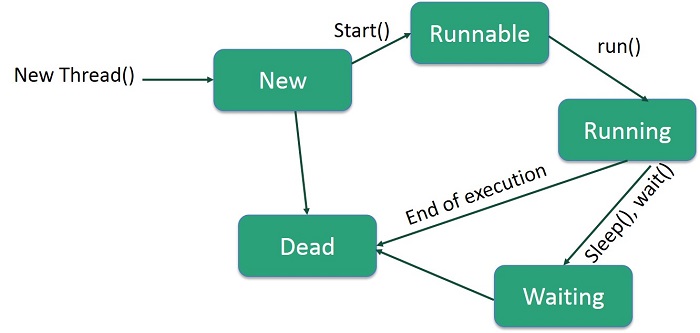
Following are the stages of the life cycle −
Thread PrioritiesEvery Java thread has a priority that helps the operating system determine the order in which threads are scheduled. Java thread priorities are in the range between MIN_PRIORITY (a constant of 1) and MAX_PRIORITY (a constant of 10). By default, every thread is given priority NORM_PRIORITY (a constant of 5). Threads with higher priority are more important to a program and should be allocated processor time before lower-priority threads. However, thread priorities cannot guarantee the order in which threads execute and are very much platform dependent. Create a Thread by Implementing a Runnable InterfaceIf your class is intended to be executed as a thread then you can achieve this by implementing a Runnable interface. You will need to follow three basic steps − Step 1: Implement run() MethodAs a first step, you need to implement a run() method provided by a Runnable interface. This method provides an entry point for the thread and you will put your complete business logic inside this method. Following is a simple syntax of the run() method − public void run( ) Step 2: Instantiate a Thread ObjectAs a second step, you will instantiate a Thread object using the following constructor − Thread(Runnable threadObj, String threadName); Where, threadObj is an instance of a class that implements the Runnable interface and threadName is the name given to the new thread. Step 3: Call Thread using start() MethodOnce a Thread object is created, you can start it by calling start() method, which executes a call to run( ) method. Following is a simple syntax of start() method − void start(); Example: Create Thread by Implementing Runnable InterfaceHere is an example that creates a new thread and starts running it − class RunnableDemo implements Runnable {
private Thread t;
private String threadName;
RunnableDemo( String name) {
threadName = name;
System.out.println("Creating " + threadName );
}
public void run() {
System.out.println("Running " + threadName );
try {
for(int i = 4; i > 0; i--) {
System.out.println("Thread: " + threadName + ", " + i);
// Let the thread sleep for a while.
Thread.sleep(50);
}
} catch (InterruptedException e) {
System.out.println("Thread " + threadName + " interrupted.");
}
System.out.println("Thread " + threadName + " exiting.");
}
public void start () {
System.out.println("Starting " + threadName );
if (t == null) {
t = new Thread (this, threadName);
t.start ();
}
}
}
public class TestThread {
public static void main(String args[]) {
RunnableDemo R1 = new RunnableDemo( "Thread-1");
R1.start();
RunnableDemo R2 = new RunnableDemo( "Thread-2");
R2.start();
}
}
OutputCreating Thread-1 Starting Thread-1 Creating Thread-2 Starting Thread-2 Running Thread-1 Thread: Thread-1, 4 Running Thread-2 Thread: Thread-2, 4 Thread: Thread-1, 3 Thread: Thread-2, 3 Thread: Thread-1, 2 Thread: Thread-2, 2 Thread: Thread-1, 1 Thread: Thread-2, 1 Thread Thread-1 exiting. Thread Thread-2 exiting. Create a Thread by Extending a Thread ClassThe second way to create a thread is to create a new class that extends Thread class using the following two simple steps. This approach provides more flexibility in handling multiple threads created using available methods in Thread class. Step 1: Override run() MethodYou will need to override run( ) method available in Thread class. This method provides an entry point for the thread and you will put your complete business logic inside this method. Following is a simple syntax of run() method − public void run( ) Step 2: Call Thread using start() MethodOnce Thread object is created, you can start it by calling start() method, which executes a call to run( ) method. Following is a simple syntax of start() method − void start( ); Example: Create Thread by Extending Thread ClassHere is the preceding program rewritten to extend the Thread − class ThreadDemo extends Thread {
private Thread t;
private String threadName;
ThreadDemo( String name) {
threadName = name;
System.out.println("Creating " + threadName );
}
public void run() {
System.out.println("Running " + threadName );
try {
for(int i = 4; i > 0; i--) {
System.out.println("Thread: " + threadName + ", " + i);
// Let the thread sleep for a while.
Thread.sleep(50);
}
} catch (InterruptedException e) {
System.out.println("Thread " + threadName + " interrupted.");
}
System.out.println("Thread " + threadName + " exiting.");
}
public void start () {
System.out.println("Starting " + threadName );
if (t == null) {
t = new Thread (this, threadName);
t.start ();
}
}
}
public class TestThread {
public static void main(String args[]) {
ThreadDemo T1 = new ThreadDemo( "Thread-1");
T1.start();
ThreadDemo T2 = new ThreadDemo( "Thread-2");
T2.start();
}
}
OutputCreating Thread-1 Starting Thread-1 Creating Thread-2 Starting Thread-2 Running Thread-1 Thread: Thread-1, 4 Running Thread-2 Thread: Thread-2, 4 Thread: Thread-1, 3 Thread: Thread-2, 3 Thread: Thread-1, 2 Thread: Thread-2, 2 Thread: Thread-1, 1 Thread: Thread-2, 1 Thread Thread-1 exiting. Thread Thread-2 exiting. Thread MethodsFollowing is the list of important methods available in the Thread class.
The previous methods are invoked on a particular Thread object. The following methods in the Thread class are static. Invoking one of the static methods performs the operation on the currently running thread.
ExampleThe following ThreadClassDemo program demonstrates some of these methods of the Thread class. Consider a class DisplayMessage which implements Runnable − // File Name : DisplayMessage.java
// Create a thread to implement Runnable
public class DisplayMessage implements Runnable {
private String message;
public DisplayMessage(String message) {
this.message = message;
}
public void run() {
while(true) {
System.out.println(message);
}
}
}
Following is another class which extends the Thread class − // File Name : GuessANumber.java
// Create a thread to extentd Thread
public class GuessANumber extends Thread {
private int number;
public GuessANumber(int number) {
this.number = number;
}
public void run() {
int counter = 0;
int guess = 0;
do {
guess = (int) (Math.random() * 100 + 1);
System.out.println(this.getName() + " guesses " + guess);
counter++;
} while(guess != number);
System.out.println("** Correct!" + this.getName() + "in" + counter + "guesses.**");
}
}
Following is the main program, which makes use of the above-defined classes − // File Name : ThreadClassDemo.java
public class ThreadClassDemo {
public static void main(String [] args) {
Runnable hello = new DisplayMessage("Hello");
Thread thread1 = new Thread(hello);
thread1.setDaemon(true);
thread1.setName("hello");
System.out.println("Starting hello thread...");
thread1.start();
Runnable bye = new DisplayMessage("Goodbye");
Thread thread2 = new Thread(bye);
thread2.setPriority(Thread.MIN_PRIORITY);
thread2.setDaemon(true);
System.out.println("Starting goodbye thread...");
thread2.start();
System.out.println("Starting thread3...");
Thread thread3 = new GuessANumber(27);
thread3.start();
try {
thread3.join();
} catch (InterruptedException e) {
System.out.println("Thread interrupted.");
}
System.out.println("Starting thread4...");
Thread thread4 = new GuessANumber(75);
thread4.start();
System.out.println("main() is ending...");
}
}
class DisplayMessage implements Runnable {
private String message;
public DisplayMessage(String message) {
this.message = message;
}
public void run() {
while(true) {
System.out.println(message);
}
}
}
class GuessANumber extends Thread {
private int number;
public GuessANumber(int number) {
this.number = number;
}
public void run() {
int counter = 0;
int guess = 0;
do {
guess = (int) (Math.random() * 100 + 1);
System.out.println(this.getName() + " guesses " + guess);
counter++;
} while(guess != number);
System.out.println("** Correct!" + this.getName() + "in" + counter + "guesses.**");
}
}
OutputStarting hello thread... Starting goodbye thread... Hello Hello Hello Hello Hello Hello Goodbye Goodbye Goodbye Goodbye Goodbye ....... Major Java Multithreading ConceptsWhile doing Multithreading programming in Java, you would need to have the following concepts very handy − 
Advertisements
| ||||||||||||||||||||||||||||||
| You are visitor 01402503 — GeezerVison does not store the pages you look up. Best viewed with Netscape Navigator 4.7 or Internet Explorer 6 at 800×600. No cookies required. |