GeezerVisonThe World Wide Web, restored to 800 pixels of glory. |
| Home|About|Gaming cabinet|Archives|How it works|Starter sites |
GeezerVison is showing www.tutorialspoint.com — Java Multi-Dimensional Arrays 
Selected Reading
Java Multi-Dimensional ArraysTwo-dimensional arrays are used to store data in rows and columns, where each row can represent a separate individual array. In short, a two-dimensional array contains one-dimensional arrays of elements. Creating a 2D ArrayIn Java, we can declare a two-dimensional array in multiple ways, but the correct and most common way to declare a two-dimensional array is as follows: data_type[][] name_of_Array = new data_type[p][q]; Where "p" represents the number of rows and "q" represents the number of columns. The total number of elements to be stored in a 2D array is equal to the product of p and q (p × q). For example: int[][] array1 = new int [2][2] The total number of elements to be stored in array1 is 2 × 2 = 4. 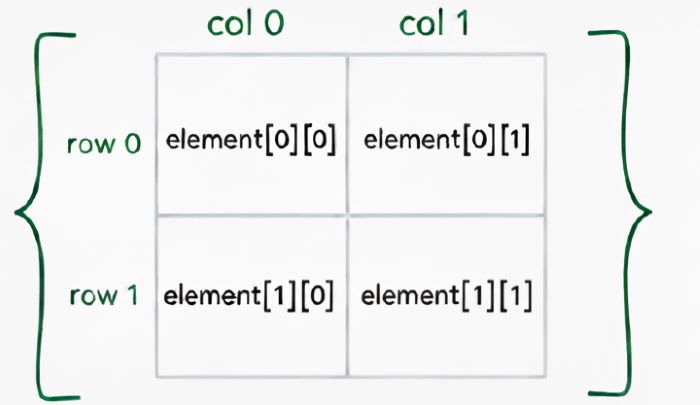
Initializing a 2D ArrayWe can add values to a two-dimensional array in three different ways, they are as follows: Direct InitializationIn Java, we can directly initialize the values of a two-dimensional array when declaring the two-dimensional array. The following is the syntax for direct initialization of a 2D array: dataType[][] name_of_Array = {
{value_1_of_row_1, value_2_of_row_1, ...},
{value_1_of_row_2, value_2_of_row_2, ...},
... more number rows
};
By IndexingIn Java, we can initialize the values of a two-dimensional array by specifying the indexing of the elements, i.e, the row index and column index of the 2D array. The following is the syntax for initializing the value of a 2D array by indexing: name_of_Array [rowIndex][columnIndex] = value; Using Nested For LoopsIn Java, we can initialize the values of a two-dimensional array using nested for loops, in which the first loop is used to iterate over the rows and the second is used to iterate over the columns. The following is the syntax for initializing the value of a 2D array using nested for loops: for (int i = 0; i < rows; i++) {
for (int j = 0; j < columns; j++) {
name_of_Array [i][j] = value;
}
}
ExampleBelow is an example for declaring a two-dimensional array and initializing its values using different methods in Java: public class Test {
public static void main(String args[]) {
// Using direct initialization
int[][] int_2DArray = { {1, 2}, {3, 4}, {5,6}};
System.out.println("Using direct initialization");
for (int i = 0; i < 3; i++) {
for (int j = 0; j < 2 ; j++) {
System.out.print(int_2DArray[i][j] + " ");
}
System.out.println();
}
//using indexing
String[][] string_2DArray = new String[2][2];
string_2DArray[0][0] = "Welcome";
string_2DArray[0][1] = "to";
string_2DArray[1][0] = "Tutorials";
string_2DArray[1][1] = "Point";
System.out.println("\nUsing indexing ");
for (int i = 0; i < 2; i++) {
for (int j = 0; j < 2; j++) {
System.out.print(string_2DArray[i][j] + " ");
}
}
//Using nested for Loops
double[][] double_2DArray = new double[2][2];
for (int i = 0; i < 2; i++) {
for (int j = 0; j < 2; j++) {
double_2DArray[i][j] = (i + 1) * (j + 1) * 1.5;
}
}
System.out.println("\n \nUsing nested for Loops");
for (int i = 0; i < 2; i++) {
for (int j = 0; j < 2; j++) {
System.out.print(double_2DArray[i][j] + " ");
}
System.out.println();
}
}
}
OutputUsing direct initialization 1 2 3 4 5 6 Using indexing Welcome to Tutorials Point Using nested for Loops 1.5 3.0 3.0 6.0 Accessing a 2D ArrayA two-dimensional array is represented by two indices, where the first index denotes the position of the array and the second index represents the position of the element within that particular array. For example: int[][] myArray = {{10, 20, 30}, {11, 21, 31}, {12, 22, 32} }
Below is the image representation of the above two-dimensional array: 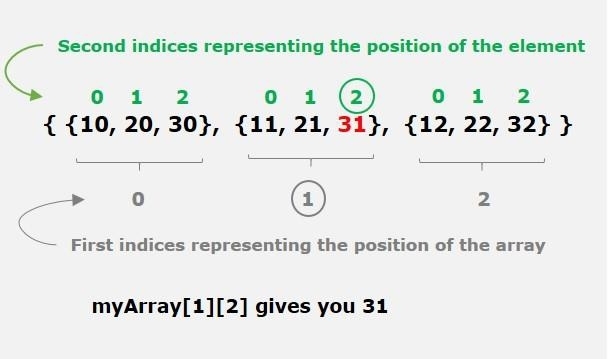
ExampleBelow is an example for accessing an element in a two-dimensional array in Java: public class Test {
public static void main(String[] args) {
int[][] myArray = {
{10, 20, 30},
{11, 21, 31},
{12, 22, 32}
};
int value = myArray[1][2];
System.out.println("The value at myArray[1][2] is: " + value);
}
}
OutputThe value at myArray[1][2] is: 31 Printing a 2D ArrayIn Java, we can print a two-dimensional array using the following method: Using Nested For LoopsThe most common way to print the elements of a two-dimensional array is using nested for loops, in which the first loop is used to iterate over the rows and the second is used to iterate over the columns. The following is the syntax for printing a 2D array in Java using nested for loops: for (int i = 0; i < rows; i++) {
for (int j = 0; j < columns; j++) {
System.out.println(name_of_Array [i][j]);
}
}
Using Arrays.deepToString() MethodThe Arrays.deepToString() method is used to print the multidimensional arrays in Java, and it allows us to easily print a two-dimensional array. The following is the syntax for printing a 2D array using the Arrays.deepToString() method: System.out.println(Arrays.deepToString(name_of_Array)) ExampleBelow is an example for printing a two-dimensional array using two different methods in Java: import java.util.Arrays;
public class Test {
public static void main(String[] args) {
//Using nested for loops
int[][] myArray_1= {
{1, 2, 3},
{4, 5, 6},
{7, 8, 9}
};
System.out.println("Printing a 2D array using nested loops:");
for (int i = 0; i < myArray_1.length; i++) {
for (int j = 0; j < myArray_1[i].length; j++) {
System.out.print(myArray_1[i][j] + " ");
}
System.out.println();
}
// Using Arrays.deepToString() method
String[][] myArray_2 = {
{"Welcome", "to", "Tutorials"},
{"Point", "start", "learning"}
};
System.out.println("\nPrinting a 2D array using Arrays.deepToString:");
System.out.println(Arrays.deepToString(myArray_2));
}
}
OutputPrinting a 2D array using nested loops: 1 2 3 4 5 6 7 8 9 Printing a 2D array using Arrays.deepToString: [[Welcome, to, Tutorials], [Point, start, learning]] 
Advertisements
|
| You are visitor 01402503 — GeezerVison does not store the pages you look up. Best viewed with Netscape Navigator 4.7 or Internet Explorer 6 at 800×600. No cookies required. |