GeezerVisonThe World Wide Web, restored to 800 pixels of glory. |
| Home|About|Gaming cabinet|Archives|How it works|Starter sites |
GeezerVison is showing www.tutorialspoint.com — Java - continue Statement 
Selected Reading
Java - continue StatementThe Syntax of continue StatementThe syntax of a continue is a single statement inside any loop − continue; Flow Diagram of continue StatementSee the following image to know how continue statement works to skip the current iteration of the loop: 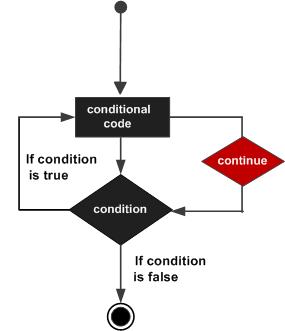
Using continue with while LoopIn a ExampleIn this example, we're showing the use of a continue statement to skip an element 15 in a while loop which is used to print element from 10 to 19. Here we've initialized an int variable x with a value of 10. Then in while loop, we're checking x as less than 20 and within while loop, we're printing the value of x and incrementing the value of x by 1. While loop will run until x becomes 15. Once x is 15, continue statement will jump the while loop while skipping the execution of the body and loop continues. public class Test {
public static void main(String args[]) {
int x = 10;
while( x < 20 ) {
x++;
if(x == 15){
continue;
}
System.out.print("value of x : " + x );
System.out.print("\n");
}
}
}
Outputvalue of x : 11 value of x : 12 value of x : 13 value of x : 14 value of x : 16 value of x : 17 value of x : 18 value of x : 19 value of x : 20 Using continue with for LoopSimilarly, in a ExampleIn this example, we're showing the use of a continue statement within a for loop to skip an elements of an array to print. Here we're creating an array of integers as numbers and initialized it some values. We've created a variable named index to represent index of the array within for loop, check it against size of the array and incremented it by 1. Within for loop body, we're printing element of the array using index notation. Once 30 is encountered as value, continue statement jumps to the update section of for loop and loop continues. public class Test {
public static void main(String args[]) {
int [] numbers = {10, 20, 30, 40, 50};
for(int index = 0; index < numbers.length; index++) {
if(numbers[index] == 30){
continue;
}
System.out.print("value of item : " + numbers[index] );
System.out.print("\n");
}
}
}
Outputvalue of item : 10 value of item : 20 value of item : 40 value of item : 50 Using continue with do while LoopSimilarly, in a ExampleIn this example, we're showing the use of a continue statement to skip an element 15 in a do while loop which is used to print element from 10 to 19. Here we've initialized an int variable x with a value of 10. Then in do while loop, we're checking x as less than 20 after body and within while loop, we're printing the value of x and incrementing the value of x by 1. While loop will run until x becomes 15. Once x is 15, continue statement will jump the while loop while skipping the execution of the body and loop continues. public class Test {
public static void main(String args[]) {
int x = 10;
do {
x++;
if(x == 15){
continue;
}
System.out.print("value of x : " + x );
System.out.print("\n");
} while( x < 20 );
}
}
Outputvalue of x : 11 value of x : 12 value of x : 13 value of x : 14 value of x : 16 value of x : 17 value of x : 18 value of x : 19 value of x : 20 Use Cases of continue StatementThe 1. Skipping Specific Values in a LoopThe ExampleIn this example, we are skipping even numbers in a for loop: for (int i = 1; i <= 10; i++) {
if (i % 2 == 0) {
continue; // Skip even numbers
}
System.out.println(i);
}
2. Ignoring Specific Input in User Input LoopsThe ExampleIn this example, we are skipping negative numbers: Scanner scanner = new Scanner(System.in);
for (int i = 0; i < 5; i++) {
System.out.print("Enter a positive number: ");
int num = scanner.nextInt();
if (num < 0) {
System.out.println("Negative numbers are not allowed, skipping...");
continue; // Skip negative numbers
}
System.out.println("You entered: " + num);
}
3. Skipping Iteration in Nested LoopsThe ExampleIn this example, we are skipping a specific condition in a grid output: for (int i = 1; i <= 3; i++) {
for (int j = 1; j <= 3; j++) {
if (i == j) {
continue; // Skip when row index equals column index
}
System.out.println("i: " + i + ", j: " + j);
}
}
4. Skipping Blank Lines While Processing FilesThe ExampleThe following code will skip empty lines in a file: BufferedReader reader = new BufferedReader(new FileReader("data.txt"));
String line;
while ((line = reader.readLine()) != null) {
if (line.trim().isEmpty()) {
continue; // Skip empty lines
}
System.out.println(line);
}
reader.close();
5. Filtering Specific Characters in a StringThe ExampleThe following code will skip vowels in a string: String str = "hello world";
for (char ch : str.toCharArray()) {
if ("aeiou".indexOf(ch) != -1) {
continue; // Skip vowels
}
System.out.print(ch);
}

Advertisements
|
| You are visitor 01402503 — GeezerVison does not store the pages you look up. Best viewed with Netscape Navigator 4.7 or Internet Explorer 6 at 800×600. No cookies required. |