GeezerVisonThe World Wide Web, restored to 800 pixels of glory. |
| Home|About|Gaming cabinet|Archives|How it works|Starter sites |
GeezerVison is showing www.tutorialspoint.com — Java - for Loop 
Selected Reading
Java - for LoopIn Java, a for loop is a repetition control structure used to execute a block of code a specific number of times. It is particularly useful when the number of iterations is known beforehand, making it an efficient way to automate repetitive tasks. For loops are used in Java for tasks such as iterating over arrays, performing calculations, and handling repetitive operations. Java for LoopThe Java for loop is an entry control loop, meaning it checks the given condition before executing the loop body. Its structured syntax makes it more readable and concise compared to other loop structures like the while loop. SyntaxThe syntax of a for loop is − for(initialization; Boolean_expression; update) {
// Statements
}
ExampleThe following example demonstrates a simple public class Test {
public static void main(String[] args) {
for (int i = 1; i <= 5; i++) {
System.out.println("Number: " + i);
}
}
}
When the above code is compiled and executed, it produces the following result − Number: 1 Number: 2 Number: 3 Number: 4 Number: 5 Structure of for LoopThe Java 1. InitializationDefines and initializes the loop counter variable. This part executes only once at the start. // Initialization example int i = 1; // Loop variable declared and initialized 2. Boolean Expression (Condition)Evaluates before each iteration. If the condition evaluates to // Condition example i <= 5; // Loop continues while i is less than or equal to 5 3. BodyContains the statements that execute repeatedly as long as the Boolean condition remains // Body of the loop
System.out.println("Iteration: " + i); // Executes in each iteration
4. UpdateModifies the loop counter at the end of each iteration. // Update example i++; // Increments i by 1 after each iteration The following is the complete syntax of a for loop with all four components: for(int i = 1; i <= 5; i++) {
System.out.println("Iteration: " + i);
}
Execution Process of a for LoopHere is the flow of control in a for loop −
Flow DiagramThe following diagram shows the flow diagram (execution process) of a for loop in Java - 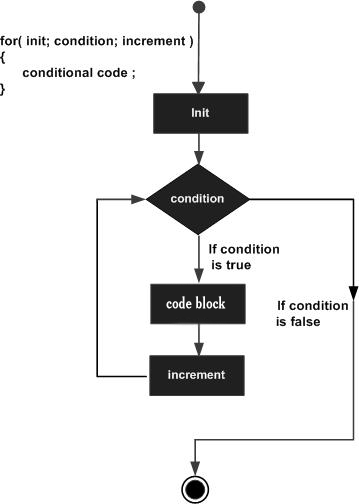
Examples of for LoopBelow are various examples demonstrating the usage of the Example 1: Printing Numbers in a Range Using for LoopIn this example, we're showing the use of a for loop to print numbers starting from 10 to 19. Here we've initialized an int variable x with a value of 10 within initialization blook of for loop. Then in expression block, we're checking x as less than 20, and in the end under update block, we're incrementing x by 1. Within body of for loop, we're printing the value of x. For loop will run until x becomes 20. Once x is 20, loop will stop execution and program exits. public class Test {
public static void main(String args[]) {
for(int x = 10; x < 20; x = x + 1) {
System.out.print("value of x : " + x );
System.out.print("\n");
}
}
}
When the above code is compiled and executed, it produces the following result − value of x : 10 value of x : 11 value of x : 12 value of x : 13 value of x : 14 value of x : 15 value of x : 16 value of x : 17 value of x : 18 value of x : 19 Example 2: Printing Array Elements Using for LoopIn this example, we're showing the use of a for loop to print contents of an array. Here we're creating an array of integers as numbers and initialized it some values. We've created a variable named index to represent index of the array within for loop, check it against size of the array and incremented it by 1. Within for loop body, we're printing element of the array using index notation. Once index becomes same as array size, for loop exits and program quits. public class Test {
public static void main(String args[]) {
int [] numbers = {10, 20, 30, 40, 50};
for(int index = 0; index < numbers.length; index++) {
System.out.print("value of item : " + numbers[index] );
System.out.print("\n");
}
}
}
When the above code is compiled and executed, it produces the following result − value of item : 10 value of item : 20 value of item : 30 value of item : 40 value of item : 50 Nested for LoopsA nested for loop is a for loop containing another for loop inside it. ExampleIn this example, we are printing tables of the numbers from 1 to 10. public class Main {
public static void main(String[] args) {
// Implementing nested for loop
// Initializing loop counters
int num = 1;
int i = 1;
// outer for loop
for (num = 1; num <= 10; num++) {
//inner for loop
System.out.print("Table of " + num + " is : ");
for (i = 1; i <= 10; i++) {
// printing table
System.out.print(num * i + " ");
}
// printing a new line
System.out.println();
}
}
}
When the above code is compiled and executed, it produces the following result − Table of 1 is : 1 2 3 4 5 6 7 8 9 10 Table of 2 is : 2 4 6 8 10 12 14 16 18 20 Table of 3 is : 3 6 9 12 15 18 21 24 27 30 Table of 4 is : 4 8 12 16 20 24 28 32 36 40 Table of 5 is : 5 10 15 20 25 30 35 40 45 50 Table of 6 is : 6 12 18 24 30 36 42 48 54 60 Table of 7 is : 7 14 21 28 35 42 49 56 63 70 Table of 8 is : 8 16 24 32 40 48 56 64 72 80 Table of 9 is : 9 18 27 36 45 54 63 72 81 90 Table of 10 is : 10 20 30 40 50 60 70 80 90 100 Infinite for LoopAn infinite loop never ends unless you stop manually by pressing CTRL + C. To implement an infinite for loop either use such a condition that is always true or directly use true as the condition. ExampleIn this example, we're showing the infinite loop using for loop. It will keep printing the numbers until you press ctrl+c to terminate the program. public class Test {
public static void main(String args[]) {
int x = 10;
for( ;; ) {
System.out.print("value of x : " + x );
x++;
System.out.print("\n");
}
}
}
When the above code is compiled and executed, it produces the following result − value of item : 10 value of item : 11 value of item : 12 value of item : 13 value of item : 14 ... ctrl+c Use Cases of Java for LoopThe 1. Iterating Over a Fixed Range of NumbersWhen the number of iterations is known, a public class ForLoopExample {
public static void main(String[] args) {
for(int i = 1; i <= 10; i++) {
System.out.println("Number: " + i);
}
}
}
2. Traversing Arrays and CollectionsThe public class ArrayTraversal {
public static void main(String[] args) {
int[] numbers = {10, 20, 30, 40, 50};
for(int i = 0; i < numbers.length; i++) {
System.out.println("Element: " + numbers[i]);
}
}
}
3. Implementing Nested LoopsIt is useful for iterating over multi-dimensional structures such as matrices. public class NestedLoopExample {
public static void main(String[] args) {
for(int i = 1; i <= 3; i++) {
for(int j = 1; j <= 3; j++) {
System.out.print(i + "," + j + " ");
}
System.out.println();
}
}
}
4. Repeating Tasks a Specific Number of TimesWhen a task needs to be repeated a set number of times, a public class RepeatTaskExample {
public static void main(String[] args) {
for(int i = 0; i < 5; i++) {
System.out.println("Task executed: " + (i+1));
}
}
}
5. Using Enhanced for Loop (for-each)Java provides an enhanced public class EnhancedForLoopExample {
public static void main(String[] args) {
String[] fruits = {"Apple", "Banana", "Cherry"};
for(String fruit : fruits) {
System.out.println(fruit);
}
}
}

Advertisements
|
| You are visitor 01402503 — GeezerVison does not store the pages you look up. Best viewed with Netscape Navigator 4.7 or Internet Explorer 6 at 800×600. No cookies required. |