GeezerVisonThe World Wide Web, restored to 800 pixels of glory. |
| Home|About|Gaming cabinet|Archives|How it works|Starter sites |
GeezerVison is showing www.tutorialspoint.com — Java - switch statement 
Selected Reading
Java - switch statementJava switch StatementJava switch statement allows a variable to be tested for equality against a list of values. Each value is called a case, and the variable being switched on is checked for each case. The switch statement can be used when multiple if-else statements are required. It can have multiple code blocks along with the case values and execute one of many code blocks based on the matched case value. SyntaxThe syntax of Java switch statement is − switch(expression) {
case value :
// Statements
break; // optional
case value :
// Statements
break; // optional
// You can have any number of case statements.
default : // Optional
// Statements
}
Rules for Using switch StatementThe following rules apply to a switch statement −
Flow Diagram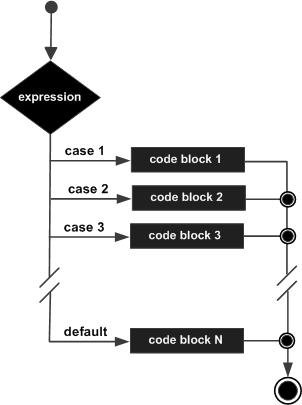
switch Statement ExamplesExample 1In this example, we're showing use of switch statement where cases are based on a char. We've created a variable grade. Based on value of grade, each case is checked. if a case is satisfied and break statement is present then following cases are not checked. public class Test {
public static void main(String args[]) {
char grade = 'C';
switch(grade) {
case 'A' :
System.out.println("Excellent!");
break;
case 'B' :
case 'C' :
System.out.println("Well done");
break;
case 'D' :
System.out.println("You passed");
case 'F' :
System.out.println("Better try again");
break;
default :
System.out.println("Invalid grade");
}
System.out.println("Your grade is " + grade);
}
}
OutputCompile and run the above program using various command line arguments. This will produce the following result − Well done Your grade is C Example 2In this example, we're showing use of switch statement where cases are based on a int. We've created a variable grade. Based on value of grade, each case is checked. if a case is satisfied and break statement is present then following cases are not checked. public class Test {
public static void main(String args[]) {
int grade = 3;
switch(grade) {
case 1 :
System.out.println("Excellent!");
break;
case 2 :
case 3 :
System.out.println("Well done");
break;
case 4 :
System.out.println("You passed");
case 5 :
System.out.println("Better try again");
break;
default :
System.out.println("Invalid grade");
}
System.out.println("Your grade is " + grade);
}
}
OutputCompile and run the above program using various command line arguments. This will produce the following result − Well done Your grade is 3 Example 3In this example, we're showing use of switch statement where cases are based on a String. We've created a variable grade. Based on value of grade, each case is checked. if a case is satisfied and break statement is present then following cases are not checked. public class Test {
public static void main(String args[]) {
String grade = "C";
switch(grade) {
case "A" :
System.out.println("Excellent!");
break;
case "B" :
case "C" :
System.out.println("Well done");
break;
case "D" :
System.out.println("You passed");
case "F" :
System.out.println("Better try again");
break;
default :
System.out.println("Invalid grade");
}
System.out.println("Your grade is " + grade);
}
}
OutputCompile and run the above program using various command line arguments. This will produce the following result − Well done Your grade is C Using default Keyword With switch StatementThe default keyword is used to specify a code block when no case value is matched. The default keyword is optional, but it should be used in the switch case statement. Example: With the default KeywordThe following example demonstrates the use of the default keyword with a switch statement: public class SwitchWithDefault {
public static void main(String[] args) {
int month = 13; // Example with an invalid month
switch (month) {
case 1:
System.out.println("January");
break;
case 2:
System.out.println("February");
break;
case 3:
System.out.println("March");
break;
case 4:
System.out.println("April");
break;
case 12:
System.out.println("December");
break;
default:
System.out.println("Invalid month");
}
}
}
OutputCompile and run the above program using various command line arguments. This will produce the following result − Invalid month Example: Without the default KeywordThe following example demonstrates the use of the default keyword with a switch statement: public class SwitchWithoutDefault {
public static void main(String[] args) {
int month = 13; // Example with an invalid month
switch (month) {
case 1:
System.out.println("January");
break;
case 2:
System.out.println("February");
break;
case 3:
System.out.println("March");
break;
case 4:
System.out.println("April");
break;
case 12:
System.out.println("December");
break;
}
}
}
OutputCompile and run the above program using various command line arguments. This will produce the following result − NO OUTPUT Note: Since the given month's value is 13 and we did not use the "default" statement here. Thus, nothing will be printed. 
Advertisements
|
| You are visitor 01402503 — GeezerVison does not store the pages you look up. Best viewed with Netscape Navigator 4.7 or Internet Explorer 6 at 800×600. No cookies required. |