GeezerVisonThe World Wide Web, restored to 800 pixels of glory. |
| Home|About|Gaming cabinet|Archives|How it works|Starter sites |
GeezerVison is showing www.tutorialspoint.com — Java - break Statement 
Selected Reading
Java - break StatementThe Java Syntax of break StatementThe syntax of a break is a single statement inside any loop or switch case − break; Flow Diagram of break StatementSee the following image to know how break statement works to stop the execution of a loop: 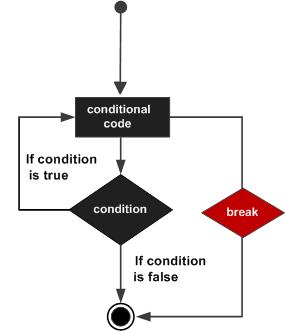
Using break with while LoopYou can use the break statement can be used with the while loop to stop its execution. ExampleIn this example, we're showing the use of a break statement to break a while loop to print numbers starting from 10 to 14 which will otherwise print element till 19. Here we've initialized an int variable x with a value of 10. Then in while loop, we're checking x as less than 20 and within while loop, we're printing the value of x and incrementing the value of x by 1. While loop will run until x becomes 15. Once x is 15, break statement will break the while loop and program exits. public class Test {
public static void main(String args[]) {
int x = 10;
while( x < 20 ) {
if(x == 15){
break;
}
System.out.print("value of x : " + x );
x++;
System.out.print("\n");
}
}
}
Outputvalue of x : 10 value of x : 11 value of x : 12 value of x : 13 value of x : 14 Using break with for LoopYou can also use the break statement can be used with the for loop to stop its execution. ExampleIn this example, we're showing the use of a break statement within a for loop to print few elements of an array instead of all elements. Here we're creating an array of integers as numbers and initialized it some values. We've created a variable named index to represent index of the array within for loop, check it against size of the array and incremented it by 1. Within for loop body, we're printing element of the array using index notation. Once 30 is encountered as value, break statement breaks the flow of for loop and program quits. public class Test {
public static void main(String args[]) {
int [] numbers = {10, 20, 30, 40, 50};
for(int index = 0; index < numbers.length; index++) {
if(numbers[index] == 30){
break;
}
System.out.print("value of item : " + numbers[index] );
System.out.print("\n");
}
}
}
Outputvalue of item : 10 value of item : 20 Using break with an Infinite LoopAn infinite loop executes loop statements indefinitely. To stop the execution of an infinite loop, you can use the ExampleIn this example, we're showing the use of break statement to break an infinite loop using while loop. It will keep printing the numbers until the value of x becomes 15. public class Test {
public static void main(String args[]) {
int x = 10;
while( true ) {
System.out.print("value of x : " + x );
x++;
if(x == 15) {
break;
}
System.out.print("\n");
}
}
}
Outputvalue of item : 10 value of item : 11 value of item : 12 value of item : 13 value of item : 14 Using break with switch StatementThe ExampleIn this example, we demonstrate the use of the public class Test {
public static void main(String args[]) {
int day = 3;
switch (day) {
case 1:
System.out.println("Monday");
break;
case 2:
System.out.println("Tuesday");
break;
case 3:
System.out.println("Wednesday");
break;
case 4:
System.out.println("Thursday");
break;
case 5:
System.out.println("Friday");
break;
case 6:
System.out.println("Saturday");
break;
case 7:
System.out.println("Sunday");
break;
default:
System.out.println("Invalid day");
}
}
}
OutputWhen the above code is compiled and executed, it produces the following result − Wednesday 
Advertisements
|
| You are visitor 01402503 — GeezerVison does not store the pages you look up. Best viewed with Netscape Navigator 4.7 or Internet Explorer 6 at 800×600. No cookies required. |