GeezerVisonThe World Wide Web, restored to 800 pixels of glory. | ||||||||||||||||||||||||||||
| Home|About|Gaming cabinet|Archives|How it works|Starter sites | ||||||||||||||||||||||||||||
GeezerVison is showing www.tutorialspoint.com — Java - How to Use Iterator? 
Selected Reading
Java - How to Use Iterator?IteratorOften, you will want to cycle through the elements in a collection. For example, you might want to display each element. The easiest way to do this is to employ an iterator, which is an object that implements either the Iterator or the ListIterator interface. An iterator enables you to cycle through a collection, obtaining or removing elements. ListIterator extends Iterator to allow bidirectional traversal of a list and the modification of elements. Before you can access a collection through an iterator, you must obtain one. Each of the collection classes provides an iterator( ) method that returns an iterator to the start of the collection. By using this iterator object, you can access each element in the collection, one element at a time. SyntaxThe following is the syntax for declaring an iterator interface − public interface Iterator<E> Here, "E" is the type of the elements to be returned by this interface. Using the Iterator InterfaceIn general, to use an iterator to cycle through the contents of a collection, first import the java.util.Iterator library, and then follow these steps − Step 1Obtain an iterator to the start of the collection by calling the collection's iterator( ) method. Iterator<Data_Type> iterator_Name = collection_Name.iterator(); Step 2Set up a while loopthat makes a call to the hasNext( ) method. Have the loop iterate as long as hasNext( ) returns true. while(iterator_Name.hasNext()){
//Operation to be performed
}
Step 3Within the while loop, obtain each element by calling the next( ) method. Here, we are printing the elements of the Collection. System.out.println(iterator_Name.next()); For collections that implement List, you can also obtain an iterator by calling ListIterator. The Methods Declared by the Iterator InterfaceThe following are the methods supported by the iterator interface in Java −
ExampleHere is an example demonstrating an Iterator. It uses an ArrayList object, but the general principles apply to any type of collection. import java.util.ArrayList;
import java.util.Iterator;
import java.util.List;
public class IteratorDemo {
public static void main(String args[]) {
// Create an array list
List<String> al = new ArrayList<>();
// add elements to the array list
al.add("C");
al.add("A");
al.add("E");
al.add("B");
al.add("D");
al.add("F");
// Use iterator to display contents of al
System.out.print("Original contents of al: ");
Iterator<String> itr = al.iterator();
while(itr.hasNext()) {
Object element = itr.next();
System.out.print(element + " ");
}
System.out.println();
}
}
OutputOriginal contents of al: C A E B D F Using the var Keyword for IteratorThe var keyword can be used instead of the Iterator<String> to avoid repeating the long type names, as this reduces the code. Since the var keyword was introduced in Java 10, it won't work in older Java versions. ExampleBelow is an example to demonstrate the use of the var keyword with Iterators in Java − import java.util.ArrayList;
import java.util.Iterator;
import java.util.List;
public class IteratorDemo {
public static void main(String args[]) {
// Create an array list
List<String> al = new ArrayList<>();
// add elements to the array list
al.add("C");
al.add("A");
al.add("E");
al.add("B");
al.add("D");
al.add("F");
//use var keyword for iterator to display contents of al
System.out.print("Original contents of al: ");
var itr = al.iterator();
while(itr.hasNext()) {
System.out.print(itr.next() + " ");
}
System.out.println();
}
}
OutputOriginal contents of al: C A E B D F ListIteratorThe ListIterator is also a type of iterator that allows us to traverse the list in either direction, modify the list at iteration, and obtain the iterator's index in the list. ListIterator is available only to those collections that implement the List interface. A ListIterator works on the cursor position, which lies between the element that would be returned by the previous() method and the element that would be returned by the next() method. 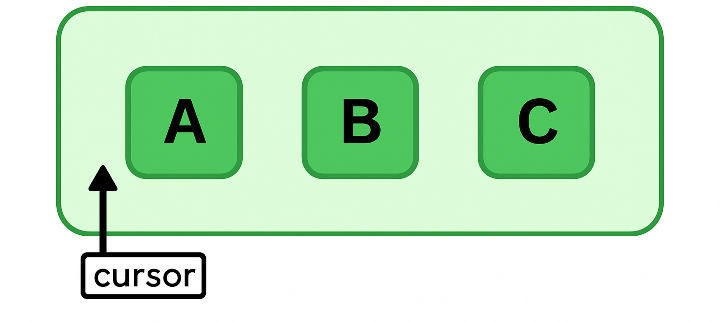
SyntaxThe following represents the syntax for initializing a ListIterator in Java − ListIterator<Data_Type> iterator_Name = List_Interface.listIterator(); The Methods Declared by ListIteratorThe following are the methods supported by the ListIterator interface in Java −
Example 1Here is an example demonstrating ListIterator. It uses an ArrayList object, but the general principles apply to any type of collection. import java.util.ArrayList;
import java.util.Iterator;
import java.util.List;
import java.util.ListIterator;
public class IteratorDemo {
public static void main(String args[]) {
// Create an array list
List<String> al = new ArrayList<>();
// add elements to the array list
al.add("C");
al.add("A");
al.add("E");
al.add("B");
al.add("D");
al.add("F");
// Use iterator to display contents of al
System.out.print("Original contents of al: ");
Iterator<String> itr = al.iterator();
while(itr.hasNext()) {
Object element = itr.next();
System.out.print(element + " ");
}
}
}
OutputOriginal contents of al: C A E B D F Example 2Here is an example demonstrating ListIterator to modify the list while iterating. It uses an ArrayList object, but the general principles apply to any type of collection. import java.util.ArrayList;
import java.util.Iterator;
import java.util.List;
import java.util.ListIterator;
public class IteratorDemo {
public static void main(String args[]) {
// Create an array list
List<String> al = new ArrayList<>();
// add elements to the array list
al.add("C");
al.add("A");
al.add("E");
al.add("B");
al.add("D");
al.add("F");
// Use iterator to display contents of al
System.out.print("Original contents of al: ");
Iterator<String> itr = al.iterator();
while(itr.hasNext()) {
Object element = itr.next();
System.out.print(element + " ");
}
System.out.println();
// Modify objects being iterated
ListIterator<String> litr = al.listIterator();
while(litr.hasNext()) {
Object element = litr.next();
litr.set(element + "+");
}
System.out.print("Modified contents of al: ");
itr = al.iterator();
while(itr.hasNext()) {
Object element = itr.next();
System.out.print(element + " ");
}
System.out.println();
// Now, display the list backwards
System.out.print("Modified list backwards: ");
while(litr.hasPrevious()) {
Object element = litr.previous();
System.out.print(element + " ");
}
System.out.println();
}
}
OutputOriginal contents of al: C A E B D F Modified contents of al: C+ A+ E+ B+ D+ F+ Modified list backwards: F+ D+ B+ E+ A+ C+ 
Advertisements
| ||||||||||||||||||||||||||||
| You are visitor 01402503 — GeezerVison does not store the pages you look up. Best viewed with Netscape Navigator 4.7 or Internet Explorer 6 at 800×600. No cookies required. |