GeezerVisonThe World Wide Web, restored to 800 pixels of glory. | |||||||||||||||||||||||||||||||||||||||||||||||||||||||||
| Home|About|Gaming cabinet|Archives|How it works|Starter sites | |||||||||||||||||||||||||||||||||||||||||||||||||||||||||
GeezerVison is showing www.tutorialspoint.com — Java - Documentation using JavaDoc tool 
Selected Reading
Java - Documentation using JavaDoc toolThis chapter is all about explaining Javadoc. We will see how we can make use of Javadoc to generate useful documentation for Java code. Java documentation can be generated using javadoc tool. It currently generates documentation in html 4.0 format. From java 9 onwards, we can generate documentation in html 5 format by using -html5 option in command line arguments. What is Javadoc?Javadoc is a tool which comes with JDK and it is used for generating Java code documentation in HTML format from Java source code, which requires documentation in a predefined format. Following is a simple example where the lines inside /*.*/ are Java multi-line comments. Similarly, the line which preceeds // is Java single-line comment. Example/**
* The HelloWorld program implements an application that
* simply displays "Hello World!" to the standard output.
*
* @author Zara Ali
* @version 1.0
* @since 2014-03-31
*/
public class HelloWorld {
public static void main(String[] args) {
// Prints Hello, World! on standard output.
System.out.println("Hello World!");
}
}
OutputHello World! You can include required HTML tags inside the description part. For instance, the following example makes use of <h1>....</h1> for heading and <p> has been used for creating paragraph break − Example/**
* <h1>Hello, World!</h1>
* The HelloWorld program implements an application that
* simply displays "Hello World!" to the standard output.
* <p>
* Giving proper comments in your program makes it more
* user friendly and it is assumed as a high quality code.
*
*
* @author Zara Ali
* @version 1.0
* @since 2014-03-31
*/
public class HelloWorld {
public static void main(String[] args) {
// Prints Hello, World! on standard output.
System.out.println("Hello World!");
}
}
OutputHello World! The javadoc TagsThe javadoc tool recognizes the following tags −
Example - Using Old style java documentationFollowing program uses few of the important tags available for documentation comments. You can make use of other tags based on your requirements. The documentation about the AddNum class will be produced in HTML file AddNum.html but at the same time a master file with a name index.html will also be created. import java.io.*;
/**
* <h1>Add Two Numbers!</h1>
* The AddNum program implements an application that
* simply adds two given integer numbers and Prints
* the output on the screen.
* <p>
* <b>Note:</b> Giving proper comments in your program makes it more
* user friendly and it is assumed as a high quality code.
*
* @author Zara Ali
* @version 1.0
* @since 2014-03-31
*/
public class AddNum {
/**
* This method is used to add two integers. This is
* a the simplest form of a class method, just to
* show the usage of various javadoc Tags.
* @param numA This is the first paramter to addNum method
* @param numB This is the second parameter to addNum method
* @return int This returns sum of numA and numB.
*/
public int addNum(int numA, int numB) {
return numA + numB;
}
/**
* This is the main method which makes use of addNum method.
* @param args Unused.
* @return Nothing.
* @exception IOException On input error.
* @see IOException
*/
public static void main(String args[]) throws IOException {
AddNum obj = new AddNum();
int sum = obj.addNum(10, 20);
System.out.println("Sum of 10 and 20 is :" + sum);
}
}
Let us compile and run the above program, this will produce the following result − Sum of 10 and 20 is :30 Now, process the above AddNum.java file using javadoc utility as follows − $ javadoc AddNum.java Loading source file AddNum.java... Constructing Javadoc information... Standard Doclet version 1.7.0_51 Building tree for all the packages and classes... Generating /AddNum.html... AddNum.java:36: warning - @return tag cannot be used in method with void return type. Generating /package-frame.html... Generating /package-summary.html... Generating /package-tree.html... Generating /constant-values.html... Building index for all the packages and classes... Generating /overview-tree.html... Generating /index-all.html... Generating /deprecated-list.html... Building index for all classes... Generating /allclasses-frame.html... Generating /allclasses-noframe.html... Generating /index.html... Generating /help-doc.html... 1 warning $ You can check all the generated documentation here − AddNum. If you are using JDK 1.7 then javadoc does not generate a great stylesheet.css, so we suggest to download and use standard stylesheet from https://docs.oracle.com Example - Using Old style java documentationRun the javadoc tool of jdk 9 with -html5 flag to generate new type of documentation. $ javadoc -html5 AddNum.java
Loading source file AddNum.java...
Constructing Javadoc information...
Building index for all the packages and classes...
Standard Doclet version 21.0.2+13-LTS-58
Building tree for all the packages and classes...
Generating .\AddNum.html...
AddNum.java:32: error: invalid use of @return
* @return Nothing.
^
AddNum.java:16: warning: use of default constructor, which does not provide a comment
public class AddNum {
^
Generating .\package-summary.html...
Generating .\package-tree.html...
Generating .\overview-tree.html...
Building index for all classes...
Generating .\allclasses-index.html...
Generating .\allpackages-index.html...
Generating .\index-all.html...
Generating .\search.html...
Generating .\index.html...
Generating .\help-doc.html...
1 error
1 warning
$
It will create a documentation as shown below: 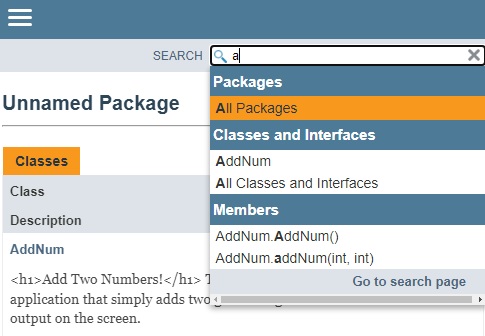

Advertisements
| |||||||||||||||||||||||||||||||||||||||||||||||||||||||||
| You are visitor 01402503 — GeezerVison does not store the pages you look up. Best viewed with Netscape Navigator 4.7 or Internet Explorer 6 at 800×600. No cookies required. |